


Before you pick an AI strategy tool, the first thing I’d ask is: strategy for what?
- Are you trying to research a new market?
- Planning a business?
- Analyze competitors?
- Forecast revenue?
- Keep your team aligned on quarterly goals?
Because they all fall under “AI strategy tools”, and that’s why this category gets confusing fast.
Most articles you see today mix them all up. ChatGPT, Canva, forecasting software, market research and SEO tools, and planning platforms are all grouped under the same label, even though each one solves a very specific problem.
That’s why I structured this list differently.
Instead of adding 20 random AI products into one roundup, I focused on 7 tools I’ve personally used for different parts of strategy work, from research and planning to financial modeling, competitor analysis, and execution.
What are AI strategy tools?
AI strategy tools are the software platforms that help people research, compare options, organize information, test ideas, forecast numbers, and make business decisions faster.
That’s the simplest way to think about them.
And yes, these tools aren’t limited to one role or business type. Startup founders, product teams, marketers, operations leads, and enterprise strategy teams all use them for different work.
That’s why the category looks so broad. Some tools help you research the market and analyze competitors faster. Some help you organize a strategy and track execution. Others help you validate assumptions, evaluate customer needs, or build financial scenarios.
For example:
- Research tools like Perplexity gather and verify market data
- Competitor analysis tools like Semrush show how you stand out
- General AI tools like ChatGPT help brainstorm, structure ideas, and draft fast
No single tool covers the whole strategy work. So businesses end up using multiple tools together. What matters is the kind of decisions AI strategy tools help you make.
Where is AI actually useful in strategic planning?
I’ve used AI for almost every part of strategy work over the last year. And here’s what I’ve seen: AI is most useful in the slow, repetitive, and research-heavy part.
The work that used to take hours (or sometimes days) now takes 20 to 30 minutes with the right tool. It reduces a lot of the manual effort around strategy work and helps with things like:
- Researching a market
- Summarizing industry reports
- Analyzing competitors
- Organizing scattered notes
- Spotting patterns in customer feedback
- Comparing pricing models
- Turning rough ideas into clear notes
For example, I’ve used it to compare competitor positioning across websites, summarize long research PDFs, brainstorm go-to-market angles, and organize product feedback into themes.
But the moment I tried using it for actual decisions, like which market to enter or which feature to prioritize, it fell apart.
I noticed AI only works with the context you give it. It doesn’t understand your customers, cash runway, team dynamics, or the real constraints around a decision. It can generate options, but it can’t judge context.
So it speeds up the process. But the actual decisions stay with you.
I don’t use AI to replace strategic thinking. I use it to move through the work faster and bring more structure to the planning.
7 Best AI Strategy Tools I’d Actually Recommend in 2026
I picked these 7 tools based on the kind of strategic part they’re actually useful for. Some are better for market research and competitor analysis. Others help with forecasting, goal tracking, execution, or product planning.
It’s not the same as in other roundups. They often list out completely different products without explaining what problem each solves.
So I grouped these tools by use case: If you’re researching a new market, there’s a tool. If you’re tracking strategy execution and goals, another tool for that.
And honestly, these tools aren’t replacements for each other.
You’ll probably end up using a couple of these together, depending on the business stage you’re in and the kind of strategic work you’re trying to do.
Find the task you’re stuck on, then you’ll know which tool to start with.
1. Upmetrics – AI business and strategic planning tool
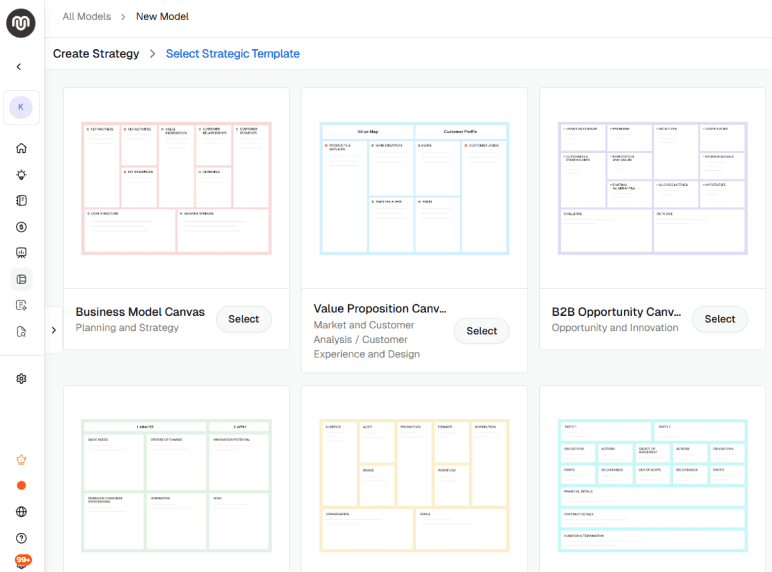
Upmetrics is a modern, AI-powered business planning platform. And while it’s technically a business plan software, I think that description is a bit too narrow for what it actually helps with.
What put it at the top of my list is how deeply AI supports the broader strategic planning workflow, not just the plan-writing part.
Beyond helping with a business plan and financial forecast, Upmetrics includes 50+ strategic canvas templates for different kinds of business thinking and decision-making. Some of the more useful ones are:
- Business Model Canvas
- Lean Canvas
- Value Proposition Canvas
- Customer Persona Canvas
- Customer Journey Map
- Product Strategy Canvas
- OKR Planning Canvas
- SWOT Analysis Canvas
- Go-to-Market Strategy Canvas
- B2B Opportunity Canvas
That’s what makes Upmetrics relevant for strategic planning, especially when you’re still shaping the business direction and need more structure around your ideas.
Here’s what stands out: you don’t have to treat planning, forecasting, and pitching as three separate jobs. You can validate an idea, map customer problems, build forecasts, and prepare a pitch without jumping between different tools or rebuilding the same information again and again.
That matters because founders usually handle these things across separate docs, spreadsheets, slide decks, and notes.
The AI assistant also helps at every step. It can get you past a blank page, organize rough ideas, rewrite sections that aren’t landing, add depth where the plan feels thin, or bring research inputs into your plan when you need more context.
In addition to that, Upmetrics includes:
- AI business plan generator to create and refine your business plan sections
- Financial forecasting software to build projections, budgets, and scenario plans
- Investor-ready pitch deck builder that pulls from your business plan and financial data
- Industry research reports and market data for your specific niche
- AI business assistant for brainstorming, rewriting, and strategic guidance
If you’re trying to turn scattered ideas into a real business plan, test the financial side, and turn the plan into a pitch deck you can share with investors, Upmetrics is a good fit. So you don’t need to maintain the different work in three different tools.
Limitations
- First-time users might feel the learning curve with advanced features
Pricing
| Plan | Pricing |
| Premium | $14/month |
| Professional | $37/month |
Ratings
- G2: 4.8
- Capterra: 4.9
- Trustpilot: 4.6
2. Perplexity – source-backed market research tool
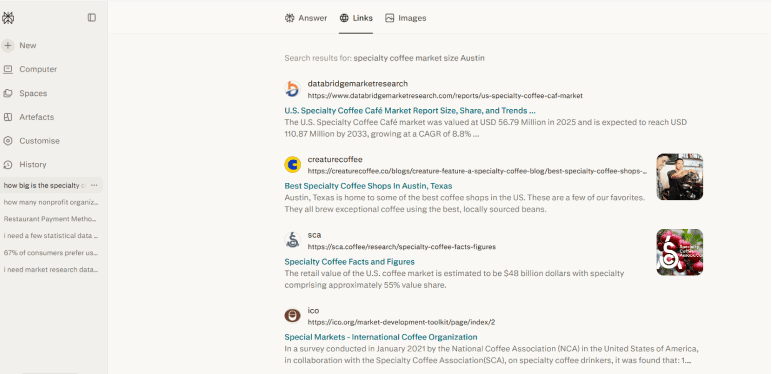
Perplexity is the most reliable AI tool I’ve used for the research side of strategy work, like market sizing, competitor scans, industry trend analysis, and fact-checking before a pitch.
It’s usually marketed as a search engine, not a strategy platform. But that’s where its real strength comes from.
Where Perplexity earns its place is in the sources. Ask “how big is the specialty coffee market in Austin” or “what’s the going rate for a barista,” and you get the citations along with the number. So you can verify the data before it ends up in a plan.
That’s the gap many generative AI tools leave open. And it’s the one that matters more when your strategy has to hold up in front of investors or lenders.
Key features
- Live web search with citations pulls answers from current sources, with every claim linked back to its origin so you can verify the information before using it.
- File uploads let you upload PDFs or docs and ask questions against your own materials, useful for analyzing competitor reports or industry data.
- Spaces for organizing related research threads, files, and notes when you’re working on a strategy project over weeks instead of days.
- Deep Research mode runs multiple searches across dozens of sources and synthesizes them into a structured report. The Pro plan includes 20 research queries per month.
- Access to multiple AI models from OpenAI, Anthropic, and Google on the Pro plan, so you can pick the best one for each prompt instead of being stuck with a single model.
Limitations
- Not a dedicated planning or forecasting tool.
- Citation quality is uneven, especially on niche topics.
- The free plan is too thin for regular research use.
Pricing
| Plan | Pricing |
| Free | $0 |
| PerplexityPro | $17/month |
| PerplexityMax | $167/month |
| EnterprisePro | $34/month |
| EnterpriseMax | $271/month |
Ratings
- G2: 4.5
- Capterra: 4.3
- Trustpilot: 1.5
3. Semrush – SEO and competitor analysis tool
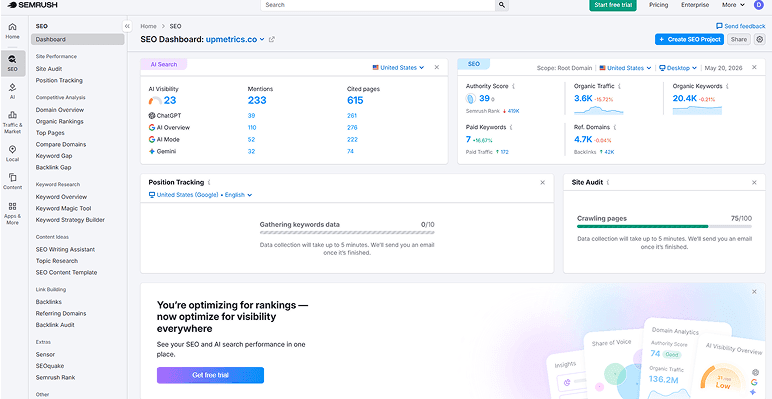
Semrush is technically an SEO tool. But the reason it’s on this list is competitor analysis.
I’ve found that “competitor analysis” in a typical business plan is mostly guesswork. You write things like “they have a strong online presence” because you don’t have real data to back it up.
Even general AI tools can’t pull live numbers, and what you find online is often outdated. Lenders and investors spot generic details instantly, and once they do, the rest of the plan loses credibility.
That’s what tools like Semrush fix. You get the actual numbers behind a competitor: the keywords they rank for, the traffic they’re pulling, the ads they’re running, and the backlinks they’ve earned. So a vague competitor section becomes one that a lender trusts.
Key features
- Side-by-side competitor analysis where you can compare up to 5 domains at once, including organic and paid keywords, backlinks, and traffic estimates.
- A keyword database with tens of billions of keywords across 140+ databases worldwide, with search volume, difficulty, and intent for each one.
- Traffic & Market toolkit for digging into competitor traffic, market trends, and growth across 190+ countries.
- AI Visibility toolkit that shows you how your brand actually appears in ChatGPT, Gemini, and Perplexity answers.
- Semrush Copilot is a built-in AI assistant that pulls data from your reports and flags the patterns worth looking at.
Limitations
- Pricey for solo founders, especially once the add-ons start piling on.
- Steep learning curve. A lot of data to figure out where to start.
Pricing
| Plan | Pricing |
| SEO | $117.33/month |
| Starter | $165.17/month |
| Pro+ | $248.17/month |
| Advanced | $455.67/month |
Ratings
- G2: 4.5
- Capterra: 4.6
- Trustpilot: 1.8
4. Planful – AI financial planning and forecasting tool
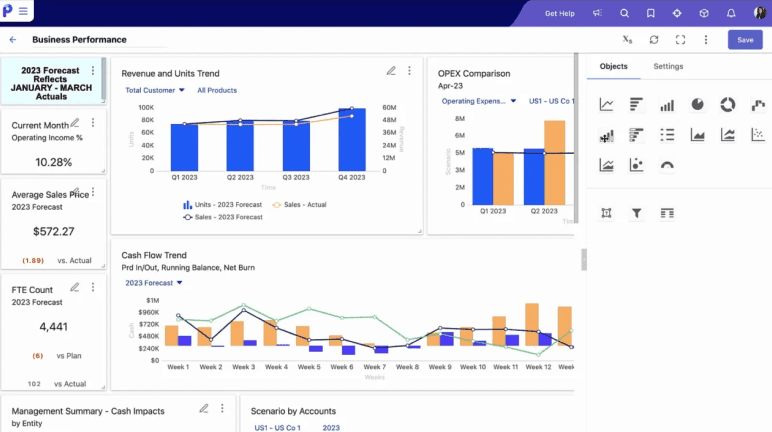
Planful is a financial planning platform for finance teams at mid-market and enterprise companies that have outgrown spreadsheets. It handles real budgeting, forecasting, and scenario modeling in one place.
I know many founders and small business owners aren’t there yet. Your forecast probably lives in Excel, and honestly, you’re not sure the numbers would hold up if anyone looked too closely. That’s fine for now. Upmetrics and QuickBooks work well at this stage.
But once you’ve hired a real finance person, or you’re managing numbers across more than one entity, those tools start breaking down. That’s when Planful is worth a look.
Key features
- The Predict suite handles your forecasting with AI, including trend projections, scenario modeling, and flagging numbers that look off before they cause problems.
- Role-based AI assistants (Analyst, Planner, Controller) work like junior team members who pull insights from your data, so you’re not digging through reports yourself.
- Rolling forecasts that tie your financials to the operational stuff that actually moves them, like headcount, sales pipeline, or production volume.
- Multi-entity consolidation for businesses running across regions or subsidiaries, with intercompany eliminations and currency translation built in.
- Integrations with the ERPs and BI tools finance teams already use, including Oracle NetSuite, Sage Intacct, and Microsoft Dynamics.
Limitations
- The AI forecasting needs 2-3 years of clean historical data to work properly.
- Steep learning curve, even for experienced Excel users.
- No free trial or free version.
Pricing
Planful doesn’t publish pricing on its website.
Ratings
- G2: 4.3
- Capterra: 4.3
- Trustpilot: 3.0
5. Cascade – AI strategy execution and KPI tracking tool
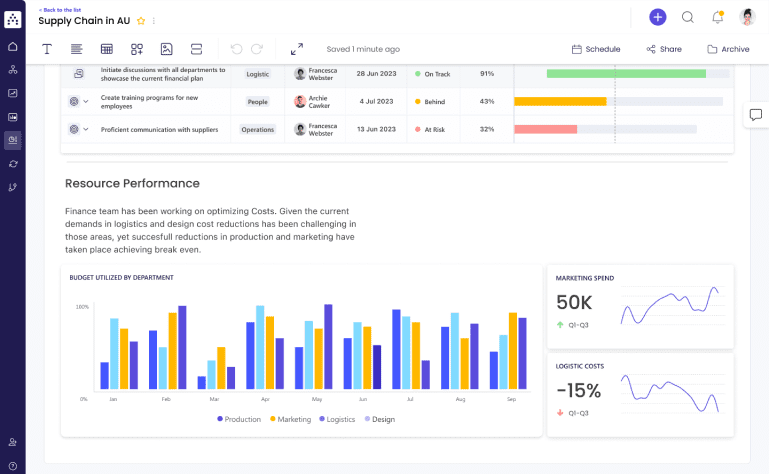
Cascade is a strategy execution platform. It turns your strategic planning goals into trackable initiatives, attaches KPIs, assigns owners, and shows real-time progress on each one.
It’s built for small to mid-sized teams that have a strategy but no good way to execute it.
So if you’re running a 5 to 50-person company, leading a department, or managing a strategy part across multiple stakeholders, Cascade connects what you decided to do with whether it’s happening.
That matters because a lot of founders face the same problem after the planning phase. The strategy goes into a Google Doc, milestones get forgotten, and six months later, you can’t tell if anyone’s still following it. This tool keeps the strategy alive instead of letting it die in a folder.
Key features
- Strategic goal hierarchy that breaks your vision into focus areas, goals, initiatives, and tasks, with progress rolling up so you see the whole picture in one view.
- Real-time KPI dashboards that show what’s on track, what’s slipping, and what needs attention before the next review.
- Strategy maps that connect each team’s goals to the company-wide direction, so everyone’s rowing the same way.
- AI insights that flag goals falling behind, spot patterns in your data, and suggest what to do next.
Limitations
- Better at executing strategy than building it, so you’ll still need a separate planning tool.
- Implementation for paid plans takes 8 to 12 weeks, longer than other tools.
Pricing
| Plan | Pricing |
| Free Plan | $0 |
| Essentials | Custom quote |
| Enterprise | Custom quote |
Ratings
- G2: 4.7
- Capterra: 4.9
6. Aha! – product strategy planning tool
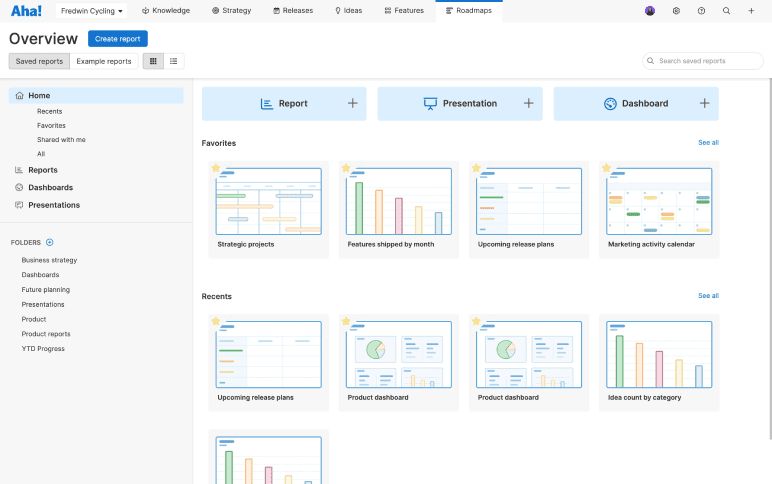
Aha! is a product development platform that helps turn strategy into a real product roadmap. If you’re running a software company, building a SaaS, or working on a digital product, this is the tool that maps your strategic goals to the features you ship.
If you’re running a service business like a coffee shop or consulting practice, this isn’t your tool. The rest of the tools on the list will serve you better.
Aha! is one of the respected names in the category, used by over a million product builders. From what I’ve noticed, the AI assistant is the real reason to consider this tool.
It drafts product strategies, generates roadmaps, pulls themes from customer feedback, scores features for prioritization, and builds interactive prototypes. So you can turn customer notes into a prioritized roadmap in hours, not days.
Key features
- AI assistant (called Elle) that drafts product strategies, generates features and initiatives, scores priorities, and builds interactive prototypes from text prompts.
- Strategic roadmaps that connect company goals to the specific releases and features you ship.
- Ideas portal where customers and teams submit feedback. AI clusters related ideas and surfaces themes from feedback at scale.
- Every Roadmaps plan comes with Ideas Essentials, Whiteboards Essentials, and Knowledge Essentials thrown in, so you can capture ideas, sketch concepts, and store docs without paying for extra tools.
- 65+ integrations with tools your dev team uses, like Jira, Azure DevOps, GitHub, Slack, and Salesforce, so your roadmap stays in sync with what’s getting built.
Limitations
- It’s built for software product teams. Not for service businesses.
- Each hub is priced separately, so the real cost depends on what you need.
- Steep learning curve, even for experienced product managers.
Pricing
| Plan | Pricing |
| Free trial | $0, 30-day trial |
| Discovery | $39/user/month |
| Roadmaps | $59/user/month |
Ratings
- G2: 4.4
- Capterra: 4.7
7. ChatGPT – Strategic brainstorming and planning tool
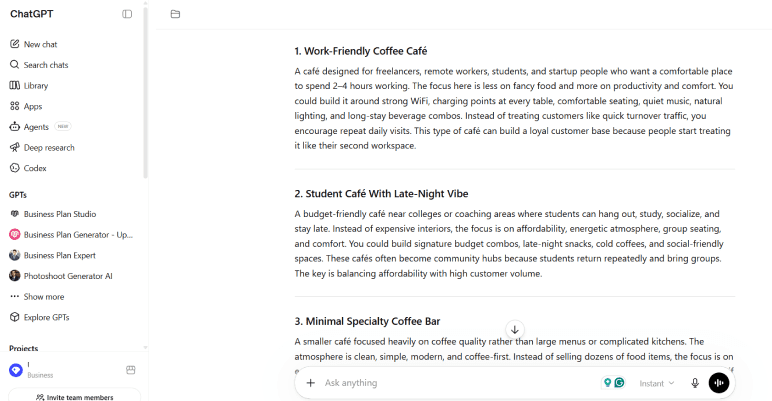
ChatGPT is a familiar tool on this list, and I know it needs no introduction. You’ve probably already used it for strategy work, whether drafting a business plan, refining positioning, or running a competitor analysis.
From my experience, it shines at the early stage of strategic thinking, the “I don’t know where to start” moment. Ask it to brainstorm 20 business name ideas, draft a SWOT, build a positioning statement, or outline a business plan, and you’ll get usable first drafts in minutes.
For founders just starting to think through their business model or strategy, this is the easiest place to begin.
Key features
- GPT-5 series reasoning that handles real strategic prompts (SWOT analyses, positioning, market sizing, scenario planning) and gives you usable first drafts.
- Deep Research mode for pulling research from across the web into a structured report on an industry, a competitor, or a market.
- Custom GPTs you can build for work you do over and over, like a “competitor analyzer” or a “business plan reviewer” with your own prompts loaded in.
- File uploads for dropping in spreadsheets, market reports, or customer feedback, and getting back a summary of what matters.
- Canvas mode for collaborative editing, so you can iterate on strategy documents alongside ChatGPT instead of going back and forth in chat.
Limitations
- Can’t access what’s happening in your business or industry right now.
- Statistics often sound real, but you need to verify them before relying on them.
Pricing
| Plan | Pricing |
| Free | $0 |
| Go | $8/month |
| Plus | $20/month |
| Pro | $100/month |
| Business Codex | Based on usage |
| Business ChatGPT & Codex | $20/user/month |
| Enterprise | Custom pricing |
Ratings
- G2: 4.6
- Capterra: 4.4
- Trustpilot: 1.6
Juggling research, forecasts, and pitch decks?
Do your whole strategy in one workspace
What to check before buying an AI strategy tool?
I’ve watched plenty of founders buy a tool, use it for two weeks, then realize the part they really needed wasn’t in their plan. Or worse, get locked into a contract for features they don’t use.
Here’s what I’d suggest to check before paying:
Ease of use
Strategy tools sit unused when they’re hard to figure out. Sign up for the free trial and try one real task. If it takes you 30 minutes to find the right button or you give up halfway, that’s your answer. The best strategy tools feel obvious within the first 10 minutes.
Quality of outputs
The output is the whole point. So test it with your real work, not a demo case. If you’re researching competitors, give it your toughest one. If you’re building a forecast, use your actual numbers.
Easy use cases look great in every tool. I think the honest test is whether it holds up when your work gets messy. If the free version’s output isn’t good enough, the paid one usually won’t fix it.
Pricing
Every tool looks affordable on the homepage. The real cost shows up later, when extra users, add-ons, and premium features stack on top.
Before paying, list how many people will use it, what features you need, and what sits behind a paywall. Add it up. If the total fits your stage, you’re good. If not, drop a tier or try a different tool.
Reviews
Homepage reviews are cherry-picked. The real picture lives on G2, Capterra, or any trusted review platform, especially in the last six months.
Skip the five-star posts that read like marketing and look for patterns. If three users complain about the same bug, missing feature, or price hike, take it seriously. Recent complaints are often what your experience will look like, too.
Conclusion
You don’t need 7 AI tools to get strategy work done. You need one or two that fit what you’re working on right now. Whether that’s writing a business plan, sizing up competitors, tracking what the team’s doing, or just brainstorming the next move.
If you’ve got a business plan to write, money to raise, or a strategy to figure out, Upmetrics is worth considering.
It handles business planning, financial forecasting, strategic frameworks, and pitch decks in one workspace. And there’s a 15-day money-back guarantee if you want to test it first.
Whatever you pick, run one real task through it before committing. That’s the fastest way to know if it actually works for you.
The Quickest Way to turn a Business Idea into a Business Plan
Fill-in-the-blanks and automatic financials make it easy.

Frequently Asked Questions
Do I need an AI strategy tool, or is ChatGPT enough?
How much do AI strategy tools cost?
What's the difference between an AI strategy tool and a regular AI tool?
How do I start using AI for my business strategy?

Vinay Kevadia
Vinay Kevadiya is the founder and CEO of Upmetrics, the #1 business planning software. His ultimate goal with Upmetrics is to revolutionize how entrepreneurs create, manage, and execute their business plans. He enjoys sharing his insights on business planning and other relevant topics through his articles and blog posts. Read more