


There is only a $1 difference between LivePlan and Upmetrics.
LivePlan’s monthly plan starts at $20. Upmetrics costs $19.
So you might think, “Okay, Upmetrics is cheaper. Maybe it gives you less.”
Nope.
I compared both tools, and Upmetrics includes several features that LivePlan either puts behind its higher-priced plan or charges extra for. Take a quick look:
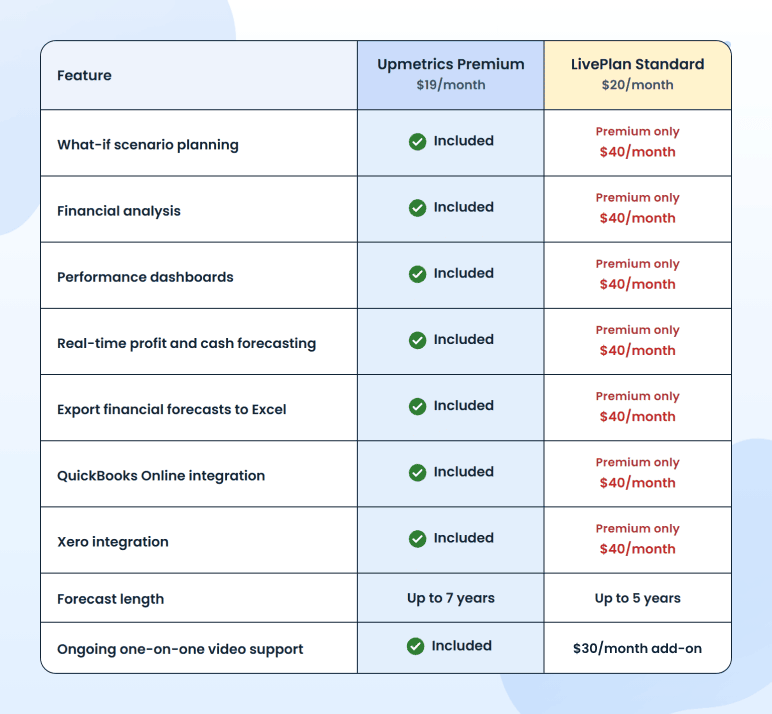
But that is only what the pricing pages tell you. I wanted to see what both tools were actually like to use, where the differences started to matter, and which one I would actually choose.
Let’s start with the core job: building a business plan
Honestly? This part is close.
Both tools start the same way—tell us about your business. What you do, what you sell, and who you sell it to, etc.
Both even let you upload supporting documents, walk you through the plan section by section, and use AI to help you draft.
The difference shows up when you get stuck.
And you will.
Maybe it happens while researching your market, comparing competitors, or working through a forecast when you are not sure what numbers to enter.
Upmetrics has a conversational AI assistant built into the platform, along with five specialist agents:
- A market analyst
- A competitive analyst
- A plan analyst
- A financial forecasting analyst
- A compliance analyst
You can ask what a section should include, request an example, ask it to explain something in simpler terms, or get help with a specific question about your business.
Say you are working on your competitive advantage and cannot figure out how to explain what makes you different. You ask the assistant right there. It responds using what it already knows about your business, and you keep writing.
But with LivePlan??? It gives you suggestions inside the worksheet, but when you’ve got a real question, you may need to open ChatGPT, explain your business again, copy the answer, come back, and find your place. You have to do this every time you get stuck.
So, is switching tabs a huge problem? Probably not.
But when you are already juggling your market, numbers, and strategy, even that small interruption creates unnecessary friction.
Hence, both tools can help you write the plan. But when you get stuck halfway through, Upmetrics is the one that keeps you moving.
Now to the numbers: financial forecasting
Again, both tools are pretty close when it comes to building a financial forecast.
You add a revenue or expense stream, tell the tool how it works—unit sales, subscriptions, or something else—enter your numbers, and it builds the financial statements for you.
No formulas. No spreadsheet headaches.
So far, so good.
But once the forecast is ready, the difference starts to show.
LivePlan’s starting plan covers the basics. But if you want to analyze those numbers properly, test different scenarios, track actual performance, export the forecast to Excel, or connect QuickBooks and Xero, you need to move to its higher-priced plan.
Upmetrics includes all of these in its starting plan.
So yes, it costs a dollar less—and you do not have to upgrade the moment you want to do something more than create the statements. Pretty cool, right?
There is another difference I found more useful than I expected.
Remember the financial forecasting analyst I mentioned earlier? You can use it while working on your numbers, too.
Say your cash runs low, expenses look too high, or you are unsure how much funding you need, just ask the analyst inside Upmetrics. It already understands your forecast, so there is no need to paste numbers into ChatGPT and explain everything again.
You also get more room to plan ahead. LivePlan lets you forecast up to 5 years. Upmetrics goes up to 7 on Premium and 10 on the Professional plan.
Will every business need a 10-year forecast? Probably not. But if you are planning a long-term expansion, raising capital, or building something that may take years to turn profitable, it is good to have the option.
So—the forecast-building itself is fairly even. The difference is what happens next: Upmetrics gives you more ways to test, track, and understand your numbers before it asks you to pay more.
So far, both tools have been pretty close. This next part? Not even a little.
Creating your pitch deck
This one matters more than most because the pitch deck is what actually goes in front of investors when you’re raising money.
With Upmetrics, you pick how to begin. Generate a deck with AI, or upload one you already have. Either way, the slides come out built for you, with your numbers already pulled straight from your business plan. No retyping revenue figures, no rebuilding your forecast somewhere else. All that’s left is a few edits. Then you export it, or present it live, right from the platform.
And here’s the thing — plenty of tools charge just for this one job. Pitch.com’s paid plans start at around $10 a month. In Upmetrics, it’s part of the plan you’re already paying for.
Now LivePlan.
You get a one-page pitch. Just one page. Seriously???
That’s not a pitch deck; that’s a summary. If you’re actually raising money, you’ll be building the real deck somewhere else anyway — which means another tool, another subscription, and an afternoon spent copying your numbers over by hand.
So yeah, one tool gives you a deck. The other gives you a page.
Alright, features aside. What happens when you get stuck and need help from an actual person?
$30 a month to talk to a human
LivePlan includes email, chat, and an onboarding session. But if you want ongoing one-on-one video support, that’s a separate add-on: another $30 a month, and that’s for a 30-minute call.
I mean — you’re already paying for the software. If you get stuck and need someone to walk you through it, should that really cost another $30 a month?
And beginners are the ones most likely to need it. You might not know whether your margins look healthy, whether your forecast is realistic, or why one number is throwing everything off.
With Upmetrics, support is included. Need a demo, want someone to walk you through a section, stuck halfway through your forecast, want a one-on-one call? You ask, and someone actually helps. No add-on, no upsell, no extra line on your invoice.
So far, we’ve only talked about you writing your own business plan. But what if…
You’re a consultant
Okay, this one’s a bit different. If you’re a consultant or an agency handling plans for a bunch of clients, the two tools aren’t really playing the same game here.
Here’s the thing with LivePlan: it’s basically one company per plan. So the second you pick up another client, you’re either buying a whole new subscription or trying to figure out their pricing, which isn’t exactly clear.
Upmetrics is built for this. The Professional plan is $49 a month and comes with three workspaces, so you can keep clients separated from the start. Need more room? Add workspaces for $7 a month each. Whether you’re running three plans or thirty, the math stays simple.
And if you want to hand clients work under your own brand, Upmetrics offers white-labeling, so the plan looks like it came from you, not from some tool. It’s an add-on at $249 a month, really meant for agencies where branded deliverables are part of the pitch. But here’s the part that matters: LivePlan doesn’t offer it at all, at any price.
So yeah, this one isn’t much of a comparison. One tool was clearly built with consultants in mind. The other just wasn’t.
By now, the pattern is hard to miss.
So, which one wins: Upmetrics or LivePlan?
Both tools can help you write a business plan. Both can build a forecast. Both can guide a first-time founder through the process.
But once you need more than the basics, the difference becomes pretty obvious.
With LivePlan, several useful features sit behind its higher-priced plan. With Upmetrics, more of the planning, forecasting, pitching, and ongoing support experience is already included from the start.
And that matters.
Because nobody wants to choose a tool at $20, get halfway through the work, and then realize the features they actually need require another upgrade.
Now, LivePlan may still suit you if you prefer its slower, highly guided workflow and only need the basics for one business.
But for most founders, business owners, and consultants, I would pick Upmetrics.
You get built-in conversational AI when you’re stuck, the financial analysis, scenarios, and integrations without immediately moving up a tier, longer forecasts, a pitch deck built from your own numbers, and a much clearer setup for managing multiple client plans.
So no, this is not really a $20-versus-$19 comparison.
It is a question of how much you get before the software starts asking you to pay more.
And on that, Upmetrics wins pretty comfortably.
It saves you a dollar. More importantly, it gives you more for it.
The Quickest Way to turn a Business Idea into a Business Plan
Fill-in-the-blanks and automatic financials make it easy.


Vinay Kevadia
Vinay Kevadiya is the founder and CEO of Upmetrics, the #1 business planning software. His ultimate goal with Upmetrics is to revolutionize how entrepreneurs create, manage, and execute their business plans. He enjoys sharing his insights on business planning and other relevant topics through his articles and blog posts. Read more