


 Download Now: Free Financial Statements Template
You pulled up your income statement, looked at it for a few seconds, scrolled to the bottom to check the profit, and quietly closed it. You’re not alone. Reading one of these for the first time is genuinely confusing, and it’s not something anyone sits you down and explains.
I get it. Many small business owners can read the top line and the bottom line. The middle (COGS, EBITDA, EBIT, all of that) is where things get tricky. The terms aren’t the hard part. Figuring out what they actually mean for your business is.
Let’s clear it up. In this guide, I’ll walk you through a real income statement, line by line, and show you what each number means. By the end, you’ll know exactly what your P&L is telling you about your business.
What an income statement actually is (and isn’t)?
An income statement is basically the performance report of your business over a set period (monthly, quarterly, or yearly). It tracks what came in (your sales), what went out (your costs), and what’s left at the end (your profit, or your loss).
It clearly answers one question: Did your business make money over the period of time? That’s it. Everything else in the document is just a more detailed version of that same story.
The formal name is “income statement,” but you’ll hear it called a few other things. Your accountant probably calls it a P&L (short for profit and loss) statement. QuickBooks labels it “Profit and Loss.” Public companies file it as a “statement of operations.” Same document, different names.
That said, an income statement doesn’t tell you everything about your business. It doesn’t show how cash actually moved in and out this period, what your business owns or owes, and what’s coming next year. Each of those questions has its own document.
For your bank balance, pull the cash flow statement. For what you own and owe, check the balance sheet. And for what’s ahead, that’s a forecast.
All three of these (along with the income statement) draw from the same accounting data, which is why owners mix them up. But each one answers a different question.
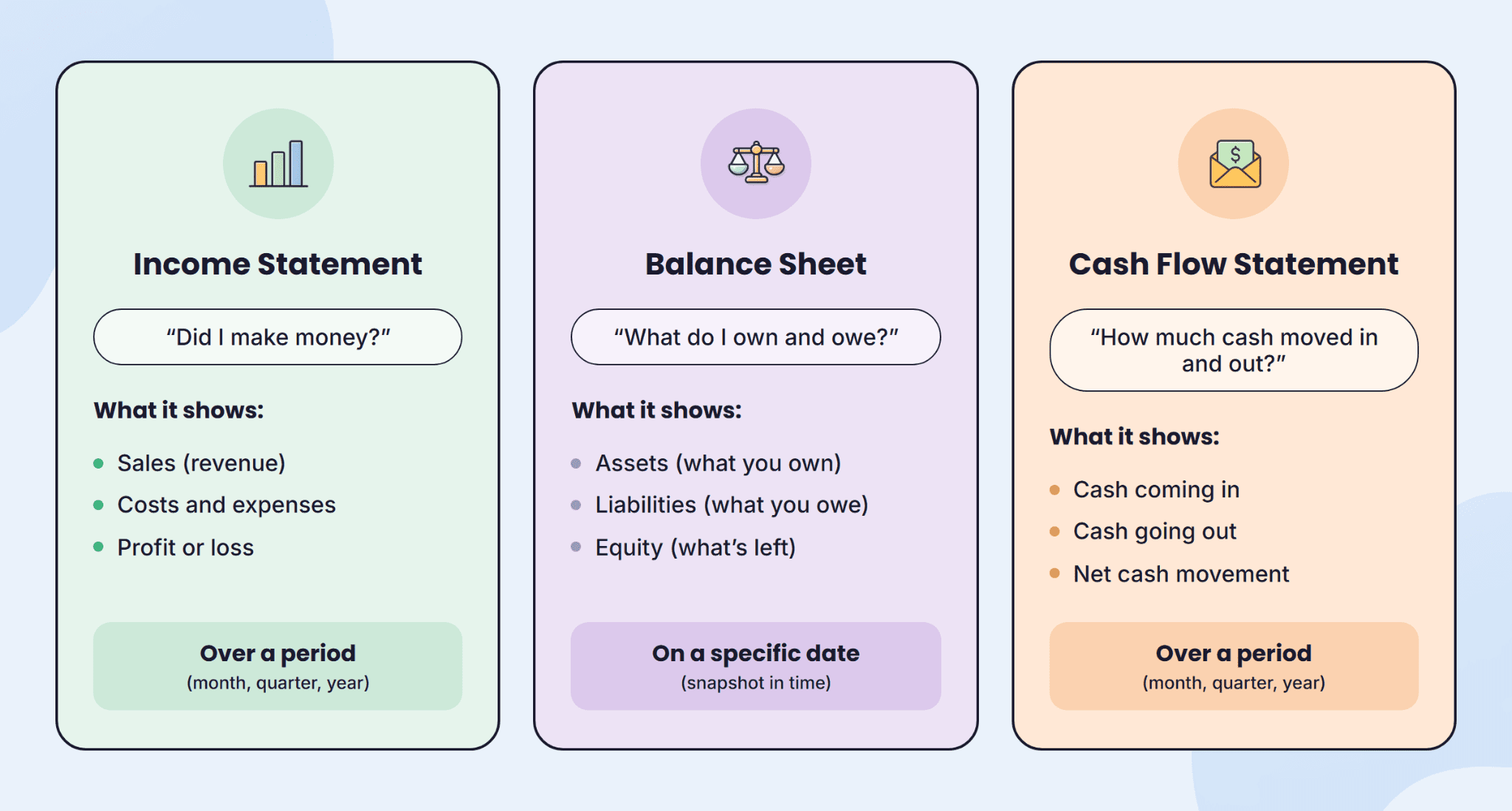
Out of all three, the income statement usually matters most for owner-operators. It’s the first thing a banker, accountant, investor, or buyer looks at to evaluate how your business is doing. And it’s the one that tells you whether you can afford to hire, raise prices, or pay yourself a salary.
The anatomy of an income statement: walking the document line by line
Now that you know what an income statement is, let’s open one up and read it line by line.
To make this easier to follow, we’ll work through a simple profit and loss statement for a small bakery called Sweet Crust. The trick is to read it from the top down. Each line shows what’s left after the line above it, so by the time you reach the bottom, you’ve got your final profit.
Here’s Sweet Crust Bakery’s full-year P&L:
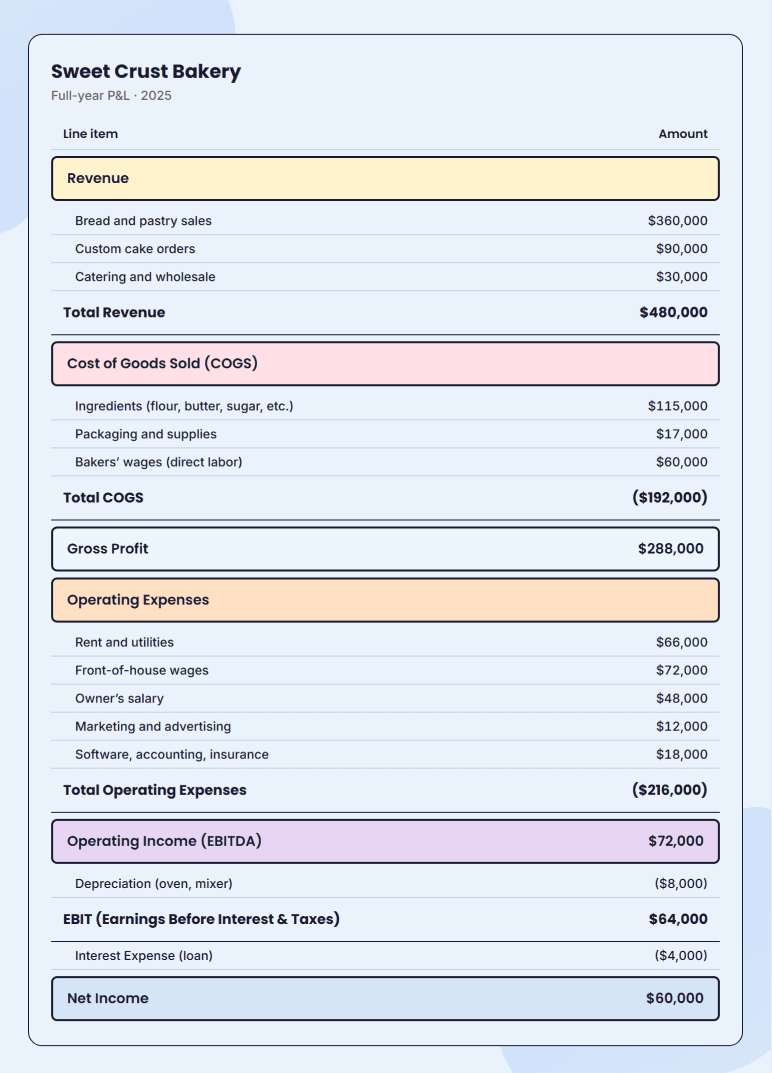
Keep this table open as we go. We’ll walk down each line, in order, and at every step, I’ll tell you what the line means, what Sweet Crust’s number is, and what to look for.
Revenue (Top line)
Revenue, also called the “top line” of your P&L, is the money you bring in from your sales. For a service business, it’s what your clients pay you. For a non-profit, it’s money raised through fundraising. For Sweet Crust Bakery, it’s $480,000 in bread, cakes, and catering.
Revenue is an important number on the document because everything else builds off of it. The lower your revenue, the lower your costs need to be to stay profitable.
So when you’re reading your own revenue line, ask yourself two things: is it growing, and is it seasonal? A flat or declining top line is the loudest alarm on the document. Fix it first.
Cost of goods sold (COGS)/direct costs
COGS, sometimes called your direct costs, are the costs that go directly into producing what you sell.
For Sweet Crust Bakery, that’s the ingredients (flour, butter, sugar), the packaging, and the wages of the bakers. Rent, marketing, and admin salaries aren’t part of COGS. Sweet Crust’s COGS for the year came to $192,000, which is 40% of revenue.
The number to watch isn’t the dollar amount. It’s the percentage. If your COGS keeps creeping up as a share of revenue and your prices haven’t changed, something’s off.
Maybe a supplier raised their prices, maybe you’re wasting more than you think, or maybe you’re underpricing the product. Worth digging into.
Compare your ratio against your industry:
| Industry | Typical COGS as % of revenue |
| Restaurants/bakeries | 28-40% |
| Retail | 50-70% |
| SaaS | 15-30% |
| Service businesses | 40-60% (when billable labor is in COGS) |
Gross profit
Gross profit is just revenue minus COGS. For Sweet Crust, that’s $480,000 minus $192,000, which leaves $288,000.
That $288,000 is what’s left to run the rest of the business: The rent, the front-of-house wages, the marketing, the loan payments.
It’s also the cleanest read on how efficient your production is. If gross profit is growing slower than your revenue, that’s a sign the business is getting bigger but not better at making the product.
Operating expenses (OpEx)
Operating expenses are all the costs of running the business that aren’t tied to actually making the product. Things like rent, utilities, marketing, software, insurance, accounting fees, front-of-house wages, and office supplies. Sweet Crust’s OpEx came to $216,000 for the year.
One thing to flag: An expense gets booked the moment you incur it, not the moment you pay it.
Whatever you owe but haven’t paid yet sits in accounts payable until the check goes out. This is one reason your P&L profit and your bank balance won’t always match.
If you’re an owner-operator, your draw or salary belongs here, too. Getting that number right matters.
When you look at your own OpEx, ask which categories are taking up the most space and whether any are growing faster than revenue.
In years two through four, the usual culprits are marketing spend, software subscriptions, and headcount. In established businesses, it’s outdated software, overlapping tools, and roles that should have been combined or cut.
Operating income and EBITDA
Operating income is gross profit minus operating expenses. For Sweet Crust, that’s $288,000 minus $216,000, leaving $72,000. You’ll often see this line called EBITDA, which stands for earnings before interest, taxes, depreciation, and amortization.
They match here because Sweet Crust’s P&L puts depreciation on its own line below OpEx. But in QuickBooks P&Ls, depreciation lives inside OpEx, so operating income equals EBIT, not EBITDA.
The formula for EBITDA = operating income + depreciation
Either way, this number tells you whether the day-to-day business is making money before financing decisions and tax strategy come into play.
It’s the line lenders and investors look at first, because it lets them compare your business to anyone else’s without the noise.
Depreciation, interest, EBIT, net income (the bottom stretch)
Below EBITDA, a few smaller lines walk you down to the actual profit you take home.
Depreciation is the portion of equipment cost expensed this year. Sweet Crust’s oven ($32,000) and mixer ($8,000) total $40,000 and get written off over 5 years, landing at $8,000 a year on the P&L. No money actually leaves the bank for this. It’s an accounting expense, not a cash one.
EBIT stands for earnings before interest and taxes. It’s EBITDA minus depreciation and amortization.
Sweet Crust doesn’t have any amortization (which applies to intangible assets like patents or software), so the math just becomes $72,000 − $8,000 = $64,000.
Interest expense is what you paid in interest on business loans. Sweet Crust paid $4,000.
Net income is the bottom line, what’s left after interest (and taxes, if they’re shown): $64,000 − $4,000 = $60,000. That’s the pre-tax profit. You can draw it, reinvest it, or set it aside for taxes.
See your full income statement update automatically

The 3 margins that matter more than the numbers
If you’ve been staring at the dollar amounts on your profit and loss statement and trying to figure out whether your business is doing well, you’re working too hard. Dollar amounts grow when revenue grows, even when the business is getting worse.
Margins make this easier to read. They convert your numbers into percentages, so you can spot what’s working and what isn’t, no matter how big the business gets.
For a small business, three margins tell you almost everything you need to know: gross, operating, and net. Each one looks at your business from a different angle.
Gross margin
Gross margin is your gross profit divided by your revenue. For Sweet Crust, that’s $288,000 ÷ $480,000, which lands at 60%.
This tells you how efficiently you produce what you sell. A bakery at 60% is healthy. At 45%, something’s off. Either ingredient costs are creeping up, or the menu prices are too soft.
Gross margin is the first place to look when you suspect a production problem because it ignores everything except revenue and the cost of making the product.
Operating margin
Operating margin is operating income divided by revenue. For Sweet Crust, that’s $72,000 ÷ $480,000 = 15%. (You may also see this called EBITDA margin when depreciation sits below operating expenses, as it does on Sweet Crust’s P&L.)
This is where rent, marketing, software, and wages show up. Two bakeries with the same gross margin can have totally different operating margins. One runs lean. The other has lifestyle creep, marketing bloat, or too many people on payroll.
Net margin
Net margin is net income divided by revenue. For Sweet Crust, $60,000 ÷ $480,000 = 12.5%.
Net margin pulls everything together because it accounts for: Loan interest, depreciation, and taxes. It’s also unstable. A single repair bill or tax payment can swing it. Use it as the final read, but don’t overreact to one bad month.
Now, here’s something I tell every owner: A margin on its own tells you almost nothing. A 15% operating margin sounds fine in isolation.
But it’s great if last quarter you were at 11%, and a warning sign if you were at 22%. Compare your margins against three things: Your past months, your industry, and what you forecasted.
Once you’re tracking all three, any drop points to a specific problem. Here’s the diagnostic:
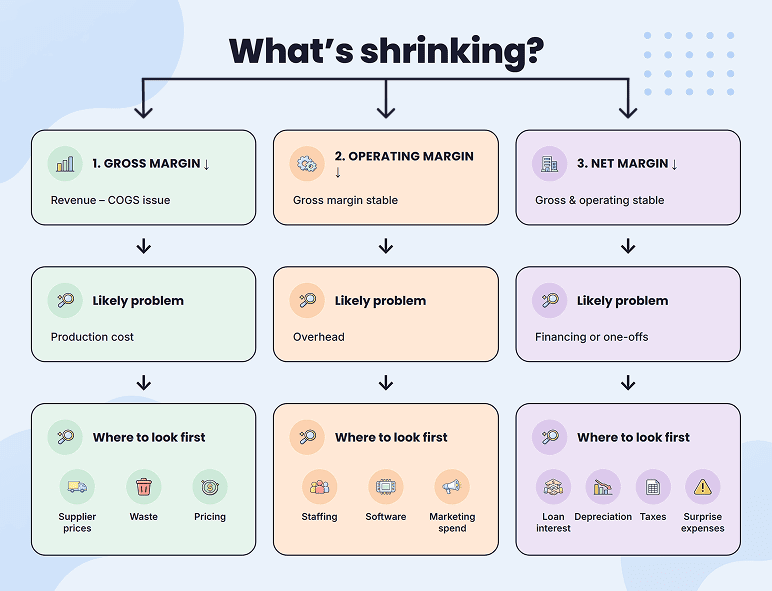
So how do you know if your margins are any good in the first place? It depends on what you do, because margins vary wildly by industry. A SaaS company at 30% gross margin is failing. A retail store at 30% is doing fine. As a rough small-business reference:
| Industry | Typical gross margin | Typical net margin |
| Restaurants/bakeries | 60-70% | 3-9% |
| Retail | 30-50% | 2-8% |
| SaaS | 70-85% | 5-25% |
| Service businesses | 40-60% | 8-15% |
These are starting points. If you’re 10 points outside your industry’s typical range in either direction, it’s worth digging in to find out why.
Reading your P&L in a trend, not a snapshot
Once you know what each line of your P&L means and how to read your margins, the next step is putting it all in motion. One month of numbers won’t tell you much. The patterns show up when you put a few months side by side, plus the same month a year ago.
There are two ways to do this:
- Reading down the statement (vertical analysis)
- Reading across the statement (horizontal analysis)
Reading down means turning every line into a percentage of revenue. For Sweet Crust in March, revenue is 100%, COGS is 40%, OpEx is 43%, and operating income is 17%.
Working in percentages lets you compare a $42,000 month to a $480,000 year directly. That’s why March OpEx (43%) looks leaner than the full-year OpEx (45%): March’s higher revenue spreads fixed overhead thinner across more sales.
Reading across is putting the same line items side by side across periods. January, February, March, or last year vs. this year. This is how you catch trends, seasonal patterns, and surprises. If your revenue grew every month and then flatlined, you want to know in month 9, not in December.
When you put both readings together, you get the full picture:
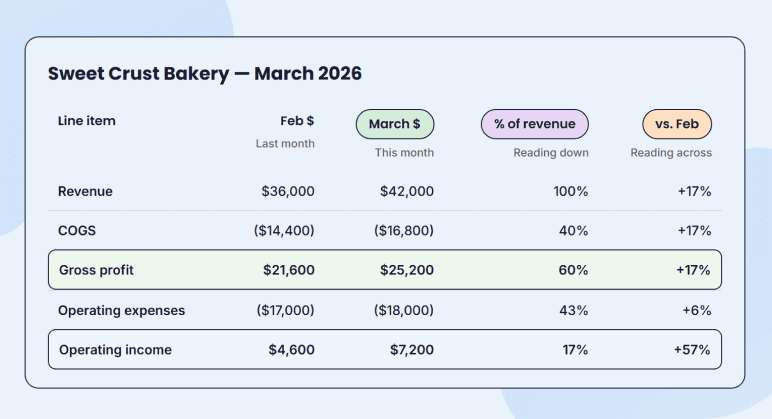
The dollars in February and March look different, but the percentages reveal more: Gross margin held steady at 60% while operating margin jumped from 13% to 17%. A snapshot would never show you that.
For your own P&L, get the last 2-3 months and the same month a year ago next to your current month. If your accounting software exports one period, look for a “comparative” or “year-over-year” view in the export settings. Every major tool has it.
Income statement vs. cash flow statement (The #1 confusion)
Your income statement says you made $4,800 last month. Your bank account has $1,200 in it. Both numbers are correct. But why they don’t match is the single most common confusion in small business finance.
The reason is simple. Your P&L records the money you’ve earned or owe. Your bank account records money that’s actually moved. Those are not the same thing.
Here’s how it looks in practice. Say you invoice a customer $5,000 in March, and they have 30 days to pay. That $5,000 shows up on March’s P&L the day you send the invoice. Your bank doesn’t see a dollar of it until April.
The same idea works in reverse: A December electric bill paid in January shows up on December’s P&L, but your bank balance didn’t drop until January.
Big purchases work the same way on a longer timeline. A $40,000 oven you bought in cash drops your bank by $40,000 that day, but the P&L shows $8,000 of depreciation each year for five years.
The one I’d flag here is loan principal. Principal payments leave your bank account every month but never show up on your P&L. Only the interest part counts as an expense. The principal just disappears from your bank account without a trace on your income statement.
If your bank account is consistently lower than your P&L suggests it should be, that’s a cash flow problem. Pulling a cash flow statement next to your income statement will show you exactly where the money went.
5 Questions to ask every time you read your income statement
Reading a profit and loss statement gets easier when you stop trying to read all of it at once. Instead, ask the same five questions every month, and over time. You’ll catch some problems before they become real ones.
- Is revenue growing, month over month and year over year? If both, demand is real. If neither, nothing else on the P&L will fix it.
- Is gross margin holding steady or going up? If it’s slipping, either your costs are climbing, or your prices are too soft. Both are fixable once you know which one it is.
- Is operating margin keeping up with revenue growth? If revenue is up but operating margin is down, your overhead is growing faster than the business can carry. That’s where to look first.
- Did any line item jump more than 25% from last month? Big spikes deserve a quick check. Either it’s a one-off, or it’s a new pattern about to cost you.
- Does the bottom line match what’s in your bank? If not, walk through the four reasons we just covered. The gap is always one of them.
The whole routine takes about five minutes, and the answers will tell you almost everything you need to know.
Build & read your income statement with Upmetrics
You can now read your P&L line by line, analyze your margins, and trace why your bank account doesn’t always reflect your profit. Those three skills are 90% of what an owner ever needs. The rest is practice.
Building a projection from scratch, though, is a different kind of work. Spreadsheets get messy fast. That’s where Upmetrics’ financial forecasting tool saves you hours.
Enter your pricing, revenue, and costs. Based on your inputs, it builds a clean 3-5 year P&L in the same format you’ve been reading. It also turns those numbers into charts so you can see your trends visually.
Further, it allows QuickBooks and Xero integration. So once you’re up and running, you can see your actual numbers next to your projections every month without rebuilding spreadsheets.
Try Upmetrics to create your P&L!
Get a Clear View of Your Finances
Build clear financial statements and track your revenue, costs, margins, and profit.

Frequently Asked Questions
Is a P&L the same as an income statement?
What should I look at first on an income statement?
What's the difference between a single-step and a multi-step income statement?
How often should I review my income statement?
Should I use accrual or cash basis accounting for my income statement?
Is EBITDA the same as profit?
Why does my P&L show profit when I have no cash?

Vinay Kevadia
Vinay Kevadiya is the founder and CEO of Upmetrics, the #1 business planning software. His ultimate goal with Upmetrics is to revolutionize how entrepreneurs create, manage, and execute their business plans. He enjoys sharing his insights on business planning and other relevant topics through his articles and blog posts. Read more