


Running a small business typically means switching roles all day.
You answer customers, chase follow-ups, plan promotions, check expenses, update your team, and still try to make time for the work that really grows the business.
That is where AI can help.
Not by running the business for you. Not by making decisions you should make yourself. But by helping with the repetitive or draft-heavy work that slows you down and eats up your time every week.
However, the hard part is figuring out where it actually fits, what it can help with, what still needs your judgment, and how to avoid generic or inaccurate work.
That is what this guide covers. You’ll find the 7 practical ways to use AI for small businesses, where to start, and what to check before you rely on the output.
Where does AI actually help in a small business?
AI is most useful when you give it real information and ask it to turn that into something clearer.
For example, you may have a customer question but need a better reply. You may have rough meeting notes, but you need a task list. You may have a product update but need social posts, an email, and a short video script.
That is the kind of work AI handles well.
It can help you draft replies, summarize notes, organize messy details, repurpose one idea into several formats, and spot repeated questions or complaints. What it does not do well is make final decisions for your business.
So before using AI for any task, ask yourself:
- Can I quickly check whether this output is correct?
- Would a wrong answer affect a customer, employee, legal issue, payment, or financial decision?
- Am I giving AI enough real context?
If it is just for your own notes or planning, it is usually fine to test. You can fix weak parts and decide what to keep.
But if customers, employees, lenders, investors, or anyone making a decision will rely on it, slow down. AI can help prepare the work, but you should review the facts, numbers, tone, and promises before using it.
Here is a simple way to check how AI will help:
| Task type | Examples | How to use AI |
| Good starting tasks | Summaries, simple emails, checklists, rewrites, or content ideas | Use AI to create a draft, then do a quick check |
| Needs careful review | Customer replies, sales emails, business plan drafts, hiring documents, and financial summaries | Use AI for support, then check facts, tone, numbers, and promises |
| High-risk tasks | Legal decisions, tax advice, final pricing, hiring decisions, or sensitive customer issues | Use AI only to organize or prepare the work. Do not let it make the final decision |
A good rule is this: use AI for drafts, summaries, ideas, and organization. Use your judgment for decisions, promises, numbers, and anything sensitive.
Once you look at AI that way, it becomes easier to see where it fits into your day-to-day work.
7 practical ways to use AI for small businesses
You do not need to use AI everywhere in your business. Start with one area that takes too much time, feels repetitive, or keeps getting pushed back.
For most businesses, that might be customer replies, content planning, lead follow-ups, meeting notes, or feedback. Once you are comfortable there, you can use AI for more careful work, like understanding reports or drafting business documents.
The 7 use cases below show you where AI can save time on the small tasks that slow you down every week, while keeping the important decisions in your hands.
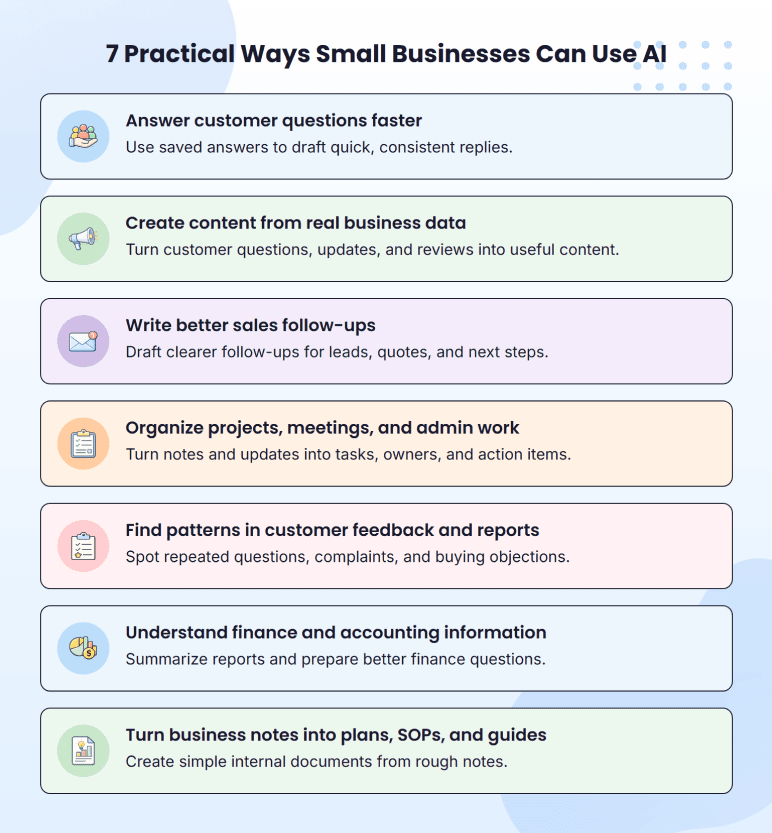
1. Answer customer questions faster
Customer replies are one of the safest places to start because many small business owners answer the same questions again and again.
Customers repeatedly ask about hours, delivery, refunds, bookings, quotes, service areas, availability, or order updates. You already know the answers. But the time goes into rewriting them every time.
AI can make those repeat replies easier, but you don’t need to set up a full chatbot on day one. Start smaller and use AI to create an answer bank. Write down your 5-7 most common questions and the answers you already give customers. Keep them in your own tone.
Then ask AI to adapt that answer for a specific customer message.
When a similar message comes in, paste your saved answers plus the new question, and ask AI to write a reply in the same tone. The important part is telling AI not to guess.
If the question falls outside your saved answers, ask AI to flag it instead. That keeps AI inside the answer you already trust. It can make the reply clearer or faster to send, but it should not create a new policy, promise a refund, or offer a discount unless you told it to.
2. Create content from real business data
Many first-time founders struggle with content creation as they start from a blank page.
AI is more effective when you provide some actual context from your business rather than expecting it to make something up. Give AI a customer question, product update, customer review, offer, transcript, or sales note. Then ask it to generate multiple valuable content pieces from that one input.
For example, you can give this kind of prompt to AI:
“Convert this customer query into 3 Instagram captions, 1 short email introduction, and 1 FAQ answer. Maintain a friendly and informative tone.”
This keeps the content grounded in what your customers really care about.
That is the real value of AI for content. It helps you repurpose what already exists in your business. A boutique can turn one product launch into an email, a social post, or a short video script. A consultant can turn one client question into a LinkedIn post, newsletter idea, and FAQ answer.
AI handles the first draft. But you still need to make it sound like your business. Check the opening line, offer, price, claim, and tone before publishing.
If the content sounds too broad or generic, add a real product detail, customer queries, local data, or a phrase you would use. That small edit makes the whole content feel more human.
3. Write better sales follow-ups
Most of the sales opportunities are not lost because the customer said no. But they are lost because the follow-up gets delayed/forgotten, or seems awkward to write.
AI can help you draft clear follow-ups for common sales situations:
| Sales situation | AI can help draft |
| A lead asked about pricing and went quiet | A soft follow-up that does not sound pushy |
| A prospect raised an objection | A helpful reply that explains value or next steps |
| Someone requested a quote but did not book | A reminder with a clear call to action |
| A past customer may need another service | A re-engagement email |
| Multiple leads ask the same question | An FAQ, sales script, or website section |
You can also paste sales notes and ask AI to find repeated objections. If several prospects ask the same thing before buying, that may be a sign that your website, emails, or sales process needs clearer information.
Just be careful with the promise. Remove fake urgency, discounts you did not approve, guarantees you cannot support, or claims that do not match your offer.
The same approach works for cold outreach, lead nurturing, and pricing follow-ups. Give it the context, ask for a few versions, pick the strongest one, and edit it in your voice before sending.
4. Organize projects, meetings, and admin work
Small teams often lose time after the actual work is discussed. A client call ends, a team meeting wraps up, or a job update comes in, and someone still has to turn everything into clear tasks, owners, deadlines, and follow-ups.
AI is useful for that middle step. You can paste rough notes and ask AI to create:
- Action items
- Weekly priorities
- Project checklists
- Client follow-up summaries
- Job status updates
- Internal recap notes
- Handoff notes
This helps businesses because work often slips through the cracks between the conversation and the next action.
One thing to note: check deadlines, owners, dependencies, and client promises before you use the output. AI may turn a casual idea into a firm commitment if you do not review it.
5. Find patterns in customer feedback and reports
Most small businesses already have more useful customer information than they realize. It’s sitting in reviews, inquiry forms, support messages, booking records, and sales notes. All the stuff you collect and never actually read through.
AI can help you sort through this faster than you can. Instead of reading every review one by one, you can ask it to group the comments by theme: common complaints, repeated praise, buying objections, or questions customers keep asking.
This is not about creating a perfect data report. It is about noticing patterns that are easy to miss when feedback is scattered.
For example, service-based businesses could review booking notes and find which services people request most often. A retailer could group product reviews to see what customers like, dislike, or keep mentioning before they buy.
Those patterns can help you improve your marketing, offers, inventory, service, website, or customer experience.
But before acting on what AI provides, check the source data yourself. If AI says customers are unhappy about delivery, read some of the original comments yourself. AI can point you toward what deserves a closer look. You still decide what to change.
6. Understand finance and accounting information
Many small business owners have financial information sitting in spreadsheets, invoices, accounting tools, bank exports, and monthly reports. The problem isn’t always access to the numbers. It’s understanding what those numbers are saying.
AI can help explain numbers in simple language. You can also use AI to:
- Summarize expense categories
- Explain a profit and loss report in simple language
- Organize assumptions
- Draft cash flow notes
- Outline monthly financial summaries
- Prepare questions for your bookkeeper or accountant
It’s most useful right before a meeting, when you want to walk in already understanding what your numbers are saying, instead of figuring it out in the room.
However, it is risky when it starts making decisions. AI is not a substitute for professional advice. Tax decisions, final forecasts, loan numbers, and financial assumptions still need proper review from someone qualified to make them.
And one more thing worth knowing: AI is confidently wrong about numbers more often than about words. Don’t trust the math without checking it. If the summary says you spent $4,200 on marketing, verify against the actual transactions before you make any decision based on that.
7. Turn business notes into plans, SOPs, and guides
You probably know how to answer new inquiries, what to tell a first-time customer, how to quote a job, or what steps your team should follow, but these things aren’t always documented.
That might be scattered across notes, spreadsheets, old chats, team conversations, or just in your head. AI can help turn those rough ideas into structured first drafts.
AI can be used to create a quote, onboard a new customer, train a new employee, process a service request, document an internal process, or explain a business idea in a one-page plan.
It’s okay if notes are not perfect. Provide AI with the rough version and request it to organize the information. This works well because the first draft provides you with some material to work on rather than starting from scratch.
Before using the draft, check whether the draft matches how your business actually works. Could a new employee follow it? Would a customer understand it? Does it include any promise, timeline, price, or assumption you would not want someone to rely on?
The goal is not just to have a polished document. It is to get repeatable work out of your head so you do not have to explain the same process every time.
How to start using AI in your small business?
The easiest way to start isn’t by testing ten tools. It’s by running one small AI task inside the work you already do.
Step 1: Pick one use case
Choose one area from the list above. Customer replies, content ideas, project notes, sales follow-ups, or reporting all work.
Start with something small enough to review quickly. Skip anything involving legal, tax, hiring, or final financial decisions for now.
Step 2: Gather the input
Know what information you need to provide AI so they can provide you with a good answer.
It could be a note, a policy, a customer question, product information, a meeting note, or sales information. Remove any personal information first: names, phone numbers, payment information, order numbers, or anything that relates to an account.
Step 3: Request for one specific output
Keep the first request to a small size. Do not request too much from AI.
Request a single answer, a simple checklist, a quick summary, a basic outline, or a set of content ideas. If the question is narrow, the solution is easier to understand and fix.
Step 4: Review it and make improvements
Check whether the answer is correct and safe to use. Look for incorrect information, missing information, incorrect voice, made-up numbers, or anything that doesn’t sound like your business. If something is off, edit and create a clear version that you can use.
Step 5: Save what worked
If the output was useful, save the prompt.
Over time, you’ll have a small set of usable prompts for tasks that come up most often, such as FAQs, captions, reports, customer replies, and weekly planning.
Here is a prompt example for your reference:
“Write a short reply to a customer asking about a late delivery. Explain that we are checking the order status and will update them within 24 hours. Keep the tone calm and helpful. Do not offer a refund or discount.”
Once you get the first answer, do not use it immediately. Ask for changes if needed. That is how AI becomes useful in daily work. Not by giving one perfect answer, but by helping you get to a better draft faster.
How to use AI safely and get better results?
Treat AI output like a starting point, not a final answer.
Read it once like a business owner, not like a writer. Ask: Is this true? Is this what we actually offer? Are the numbers right? Does it promise something we cannot do? Is there any private customer or business information in it?
That quick check will catch most of the problems before the output reaches a customer, lender, employee, or public page. Here’s what to check:
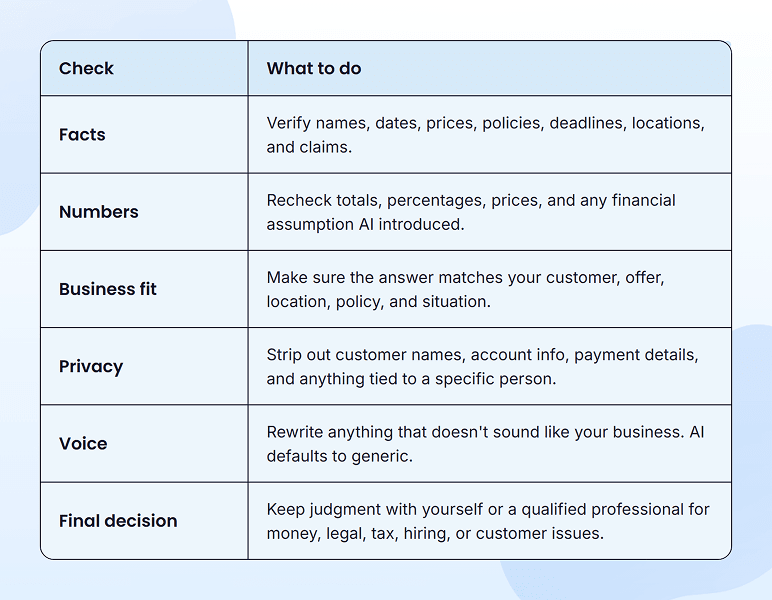
At first, this review feels like extra work. But after a few weeks of doing it on the same kinds of tasks, you’ll know what to look for in seconds.
Final thoughts
AI isn’t going to transform your business. But used in the right places, it’ll save you a few hours a week, take some repetitive work off your plate, and help you finally clear a few tasks you keep pushing aside week after week.
The owners getting the most from it aren’t building complicated workflows or running ten tools at once. They picked two or three tasks where AI actually helps, started using it consistently for those, and ignored everything else. That’s the whole pattern, honestly.
A year from now, the small businesses doing well with AI won’t be the ones running the fanciest workflows or paying for the most subscriptions. They’ll be the ones who figured out where AI fits in their actual day-to-day work, and where it’s better to just leave it alone and do the work themselves.
Find Where AI Can Save Your Team Time
Use AI to handle routine tasks across marketing, research, customer support, and operations.

Frequently Asked Questions
Do I need AI for my business?
How can small businesses use ChatGPT?
What small business can I start with AI?
Are there any risks associated with using AI in my business?

William Ranieri
William Ranieri is an experienced business consultant specializing in entrepreneurship, executive training, and leadership development. He helps clients find better ways to improve communication, balance growth with budget demands, and build stronger teams. With 40 years of interviewing and coaching, he shares practical strategies that make business challenges easier to handle and support long-term success. Read more