


 Download Now: Free Financial Statements Template
Most founders I work with would rather do almost anything than build a financial forecast. And I get it. It’s the one part of a business plan where you can’t bluff.
ChatGPT made things a lot easier, but not in the way most people think. It can research, suggest revenue streams, expense categories, and even find benchmarking data. But it’s real bad at the parts founders assume an AI should be great at, which is producing the actual numbers.
So the questions I keep getting are some version of the same three:
- Can I trust a forecast ChatGPT helped me build?
- How do I know my numbers are realistic?
- How do I forecast without historical data?
In this guide, I’ll walk you through a practical process for using ChatGPT to build financial forecasts, including where it can help, where you should stop relying on it, and the specific prompts you can use at each step.
ChatGPT is a thinking partner (not a forecasting engine)
First things first: ChatGPT is a language model. It’s built to predict text, organize ideas, and reason over information you give it. While it can be useful in different aspects of business and financial planning, you can’t expect it to generate complete, lender/investor-ready financials.
ChatGPT is a great thinking partner to figure out what your revenue streams are, what assumptions you should research, and what questions lenders might ask.
But it is not built to produce numbers tied to your specific business, do compounding math reliably, or generate three financial statements that reconcile to each other. Once you internalize that split, every part of the workflow that follows makes sense.
ChatGPT is genuinely useful for:
- Brainstorming revenue streams and expense categories specific to your business type and model.
- Structuring your assumptions: listing the variables you need to estimate before you can forecast a number (foot traffic, capture rate, ramp curve, churn).
- Researching what questions to ask about your industry, your customers, your costs, and your competition.
- Analyzing historical data, you paste in — spotting seasonality, flagging anomalies, and identifying patterns in your sales or expenses.
- Stress-testing assumptions: playing skeptical investor, listing the holes a banker will poke in your plan.
- Drafting the narrative that wraps the numbers (the assumptions section of your business plan, the explanation of why your projections look the way they do).
ChatGPT limitations as a forecasting tool
As I said, ChatGPT isn’t built for everything. It has clear limits, and the moment a forecasting task crosses into producing real numbers or balancing statements, those limits start to show.
- Generate actual revenue or expense numbers for your business. It pattern-matches to other businesses it’s read about and produces confident-looking fiction.
- Build a balanced P&L, balance sheet, and cash flow that reconcile to each other. It can’t track how a change in one statement flows through the others.
- Cite industry benchmarks reliably. It will hand you confident percentages, and sometimes invent the source.
- Model cash flow timing: the difference between booked revenue and cash received, payment terms, and working capital. It flattens all of that.
- Produce the final document that a lender or investor will see. It’s definitely polished, but there will be inconsistencies and patterns that they’ll spot in seconds.
The simplest way to remember the split: use ChatGPT to think through the forecast, and a spreadsheet or forecasting tool to build it.
Before you start: which path are you on?
Your workflow or how you’ll use ChatGPT will change depending on one thing: do you have real sales data, or are you starting from scratch?
If you’re pre-revenue or just launched, you don’t have history to forecast from. You’ll lean on market research, competitor benchmarks, and educated assumptions. ChatGPT does more of the heavy lifting on structure here because you have less to anchor to.
And if you own an existing business with at least 12 months in operation, with sales data in QuickBooks, Xero, Shopify, or your POS, you should start your forecast with your real numbers. In this case, ChatGPT will play more of a supporting role. Analyzing patterns, flagging anomalies, and sense-checking your assumptions.
And if you’re somewhere in between (6-12 months in, some data but not a full year), rely on your data where it’s reliable and consider assumptions where it isn’t. I’ll flag which path each step applies to as we go.
Step 1: Identify your revenue streams
Before you forecast a dollar, you need to know where the dollars come from. Revenue streams are the categories your sales fall into, each one behaving differently in pricing, margin, and seasonality.
For instance, a coffee shop doesn’t just sell “coffee.” It sells hot drinks, cold drinks, food, retail bags, and sometimes catering. Putting all of them together into one line hides the patterns that make a forecast useful.
ChatGPT is genuinely good at this step. It’s pattern-matched against thousands of business types and will list categories you’d miss on your own.
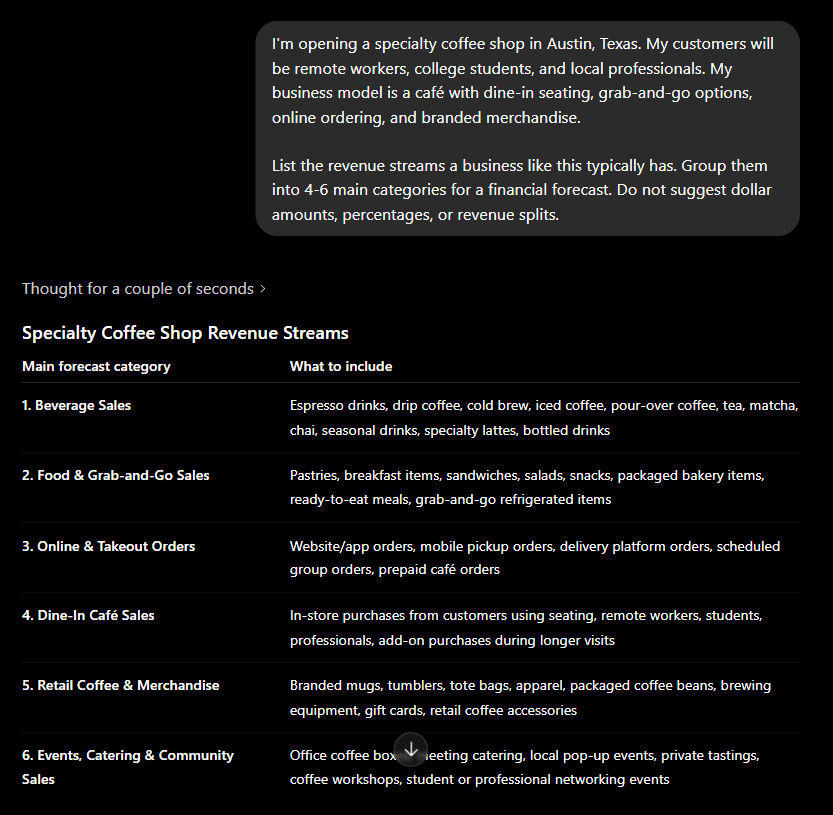
If you’re pre-revenue: Use ChatGPT to brainstorm. Prompt something like:
List the revenue streams a business like this typically has. Group them into 4-6 main categories for a financial forecast. Do not suggest dollar amounts, percentages, or revenue splits.
The last line is important. Without it, ChatGPT volunteers fake splits like “Hot beverages typically make up 60% of revenue.” To make realistic forecasts, we need to ignore those numbers.
If you have an existing business, use ChatGPT as a gap-finder.
This turns ChatGPT from a generator to an advisor. You’re not asking it to invent your revenue model. You’re asking it to compare yours against patterns it’s seen.
Now, why 4-6 categories? Fewer than 4 might hide patterns. More than 7 gets unwieldy. For a coffee shop, “Latte, Espresso, Cold Brew, Drip” is too granular. “Hot Beverages” and “Cold Beverages” are right.
Step 2: Build your pricing assumptions
Now that you know your revenue categories, each one needs a price. Pricing is where most forecasts quietly fall apart. Founders either guess too high (because of optimism) or copy a competitor without checking if the math works for their cost structure.
ChatGPT helps here in a narrow way. It can tell you what pricing inputs you need to research. It can’t tell you what to charge.
For a coffee shop, you’ll get: average drink price, food attach rate, average ticket size, weekday vs. weekend pricing, member/loyalty pricing, and daypart variation. For SaaS, you’ll get: tier pricing, ACV by segment, expansion revenue, and discount rates.
That list is the scaffolding, now you fill in the numbers.
Where the actual numbers come from:
Pre-revenue? Walk into 4-5 competitor locations. Check their menus, their Google listings, their Yelp posts. Talk to suppliers about what comparable businesses charge. Industry POS reports (Square, Toast, Shopify) publish average ticket benchmarks.
Existing business? Pull your actual average selling price per category from your POS. Look at how it has trended over 12-24 months.
For existing businesses, ChatGPT can pattern-match your pricing data:
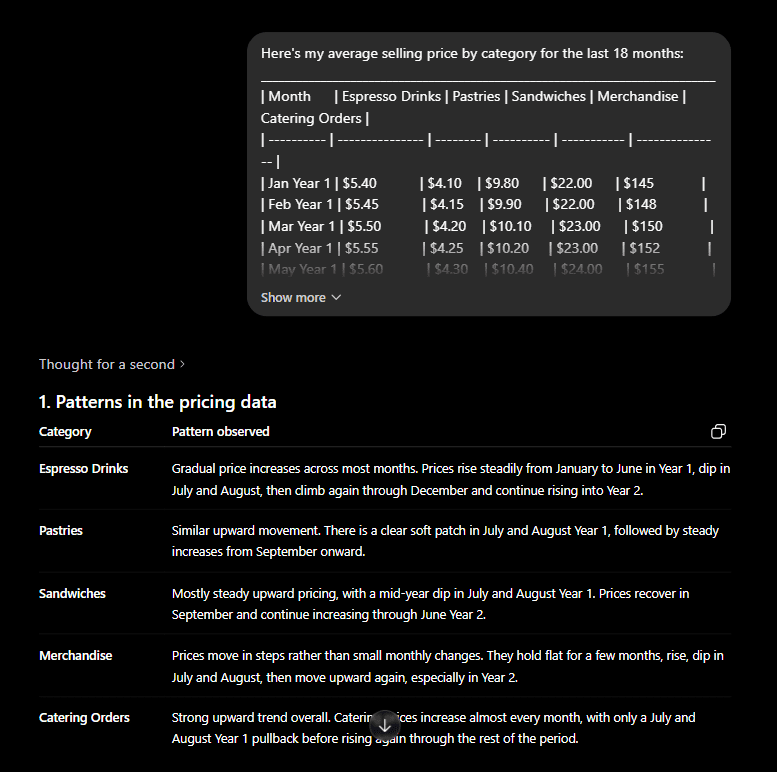
I’ve intentionally added the “without doing calculations” line. ChatGPT is good at spotting patterns in your data, not very good at math on that data, though.
Step 3: Build your sales forecast
Now, we’re piecing this information into a structured sales forecast. Volume is where hallucination does the most damage because every error here gets multiplied through the rest of the model. You get this wrong, and your revenue, your gross profit, your cash position, and your runway are all wrong.
ChatGPT can help you structure the math. It cannot produce the volume numbers for you.
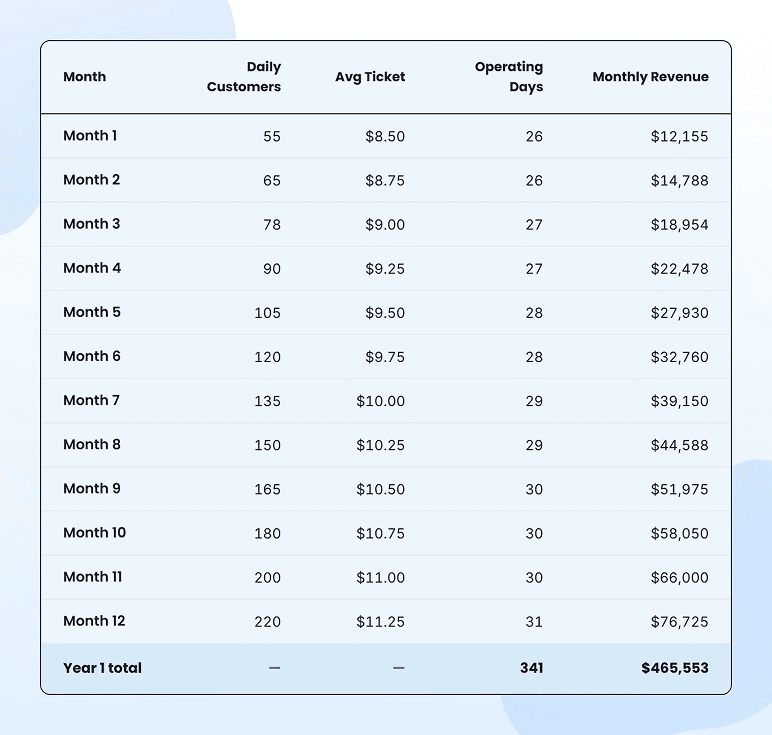
If you’re pre-revenue: Start by asking ChatGPT to give you the formula and the variables, not the answer.
You’ll get something like:
With variables: daily customer count, capture rate from foot traffic, ramp curve over the first 6 months, weekend vs. weekday split, and seasonality factors.
Now you fill in those variables with real inputs:
- Foot traffic: Use Placer.ai, your city’s transportation department, or count it yourself for a week
- Capture rate: 1-3% for a new business with no brand awareness
- Ramp: Month 1 typically runs at 30-40% of stabilized volume. Month 6 reaches 80-90% (use verified benchmarking data for your industry)
- Seasonality: Get this information from industry reports or local comparable businesses
Now, the trap to avoid: never ask ChatGPT something like, “How many customers will my coffee shop get per day in month 1?” That number isn’t reliable. Don’t use it as a forecast input.
If you have an existing business, your forecast starts with your actual data. ChatGPT’s job is pattern recognition, not projection.
You take that analysis, then build your forward forecast in a spreadsheet or using a forecasting tool:
- Your underlying growth trend (calculated from your data, not from ChatGPT)
- Your historical seasonality applied to next year
- Specific adjustments for known changes (new location, price increase, marketing campaign, hiring a salesperson)
ChatGPT is genuinely useful here for spotting things you’d miss on a chart. It’s not useful for projecting the actual forward numbers.
Step 4: Forecasting your expenses
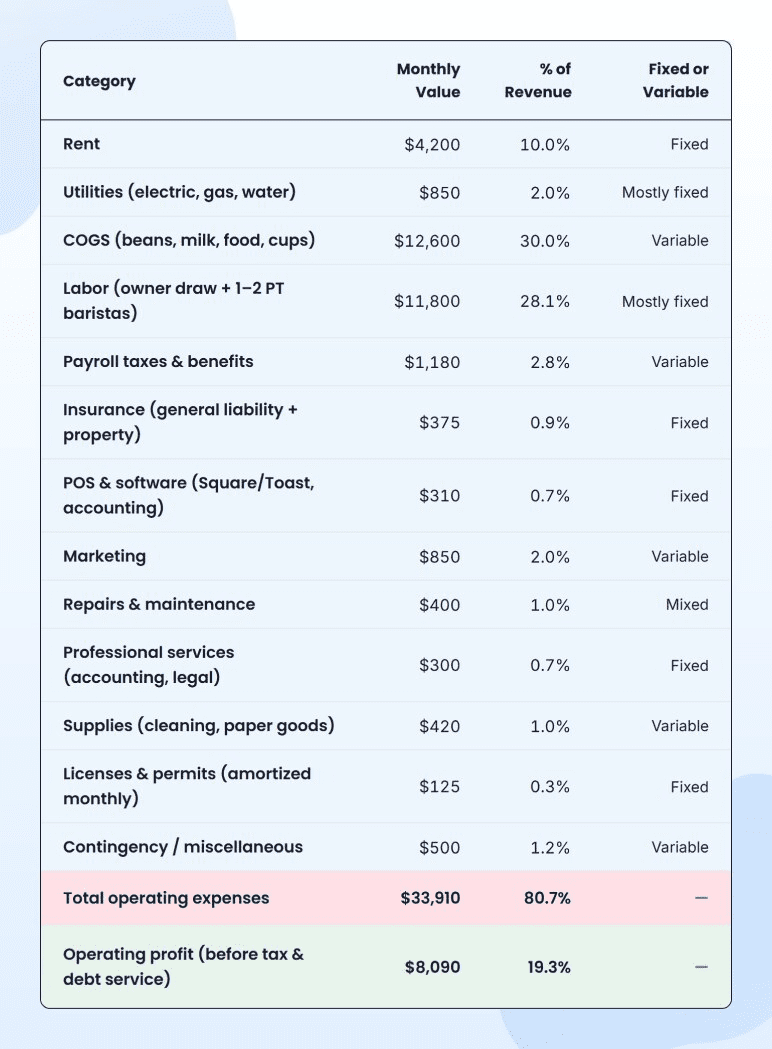
Expenses are where ChatGPT can be genuinely useful (categorizing what you’ll spend on) and genuinely dangerous (volunteering benchmark percentages that may or may not be real). The work here is splitting it into one-time startup costs and recurring monthly costs, then sourcing real numbers for each.
Pre-revenue? Start with a checklist. Ask ChatGPT to map out every expense category so nothing slips through.
Typical output for a coffee shop covers: lease deposit, build-out, equipment, POS hardware, initial inventory, permits and licenses, insurance, branding, opening marketing (one-time), then rent, utilities, COGS, labor, payroll taxes, insurance, software subscriptions, marketing, repairs, and professional services (recurring).
That list is the scaffolding. The numbers come from real sources:
- Rent: Local commercial listings (LoopNet), broker quotes, or current landlord conversations
- Equipment: Actual vendor quotes (Sysco, US Foods, espresso machine dealers)
- Labor: BLS wage data for your metro, scaled to your scheduled hours
- Insurance: Real quotes from Hiscox, Next, or a local broker
- COGS: Supplier quotes plus a markup buffer
If you have an existing business:
Pull your last 12 months of expenses from QuickBooks or Xero. Calculate each category as a % of revenue. Those percentages become your forecast baseline.
The output tells you where to dig. Maybe your labor cost is 38% of revenue when industry averages run closer to 28-32%. That’s worth a conversation, not a forecast assumption.
Step 5: Build the actual financial statements
This is the step where ChatGPT exits the workflow. You’ve done the thinking with ChatGPT: revenue streams, pricing inputs, sales structure, and expense categories.
Now the assumptions become a financial model with three statements that have to reconcile to each other. P&L feeds retained earnings on the balance sheet. The balance sheet feeds working capital into cash flow. Change one number anywhere and several others have to update.
ChatGPT can’t do this. Not because it’s not trying, but because it’s a language model, not a math model. The four ways it consistently fails here:
- Compounding math drifts over multiple years. Year 1 might be right. Year 3 will be off, and ChatGPT won’t tell you.
- Cash timing evens out. Booked revenue doesn’t mean cash received. ChatGPT treats them as the same number.
- Statements don’t reconcile. Net income on the P&L doesn’t flow into retained earnings on the balance sheet. Working capital changes don’t appear in cash flow.
- Hardcoded values appear where formulas should be. Change an upstream assumption, and downstream cells don’t update.
You should use an actual forecasting tool for this step. A spreadsheet will do if you’re comfortable with formulas and willing to build the three statements yourself. However, a forecasting tool would be faster with built-in formulas.
This is where Upmetrics fits. You don’t need to create financial statements manually. You create revenue/expense streams, and your statements start taking shape, and there’s a visual financial dashboard that your lenders and investors can actually read.
Spreadsheets are exhausting & time-consuming
Build accurate financial projections w/ AI-assisted features
Step 6: Build conservative, expected, and optimistic scenarios
Most founders stop at one scenario. That’s the version that falls apart in front of a lender because there’s no answer to “what if growth is slower?” or “what if costs run higher?”
Scenario planning fixes that. It’s basically creating 3 different versions of your financial forecasts: a conservative case (worst realistic outcome), an expected case (your honest baseline), and an optimistic case (best realistic outcome).
All three use the same model. Only a few key assumptions change. ChatGPT can help you decide which assumptions to flex. It shouldn’t decide the values.
If you’re pre-revenue, prompt ChatGPT:
What three or four assumptions should I flex to build a conservative and optimistic case? For each one, suggest a reasonable range based on businesses similar to mine.
You’ll typically get back: capture rate (flex by ±0.5-1%), ramp speed (5 months vs. 9 months to stabilized volume), average ticket (-15% to +10%), and seasonality severity.
You apply those ranges in your model. The conservative case uses the lower bound on revenue inputs and the upper bound on expenses. The optimistic case does the reverse. The expected case sits in the middle.
The variables to flex are different for an existing business. Growth rate, churn, expansion timing, and cannibalization (if you’re opening a second location) matter more than capture rates and ramp curves.
Build me three scenarios by flexing: (1) the timing of [the change], (2) the ramp speed, and (3) any cannibalization or risk to existing revenue. Suggest reasonable ranges for each. I’ve attached past statements for reference.
The output gives you the structure. You apply the numbers in your model.
Why three scenarios matter:
Lenders and investors don’t expect you to predict the future. They expect you to have thought about the range of futures and built a model that survives the bad ones. Three scenarios prove you’ve done that work.
Step 7: Use ChatGPT to stress-test your forecasts
In this final step, we change our equation with ChatGPT a little. Now, we’re asking it to go against us. Once your forecast includes real numbers, paste it back into ChatGPT and ask it to challenge the assumptions.
This is where ChatGPT is genuinely valuable, because it’s pattern-matched against thousands of business plans and lender pushback. It knows what gets questioned in those meetings, even if it can’t build the model itself.
The prompt:
[paste: customer count, average ticket, COGS %, key expense lines, owner compensation, hiring plan]
Play the role of a skeptical bank loan officer reviewing this for an SBA loan. What’s unrealistic? What’s missing? What questions would you ask before approving the loan? Be direct.
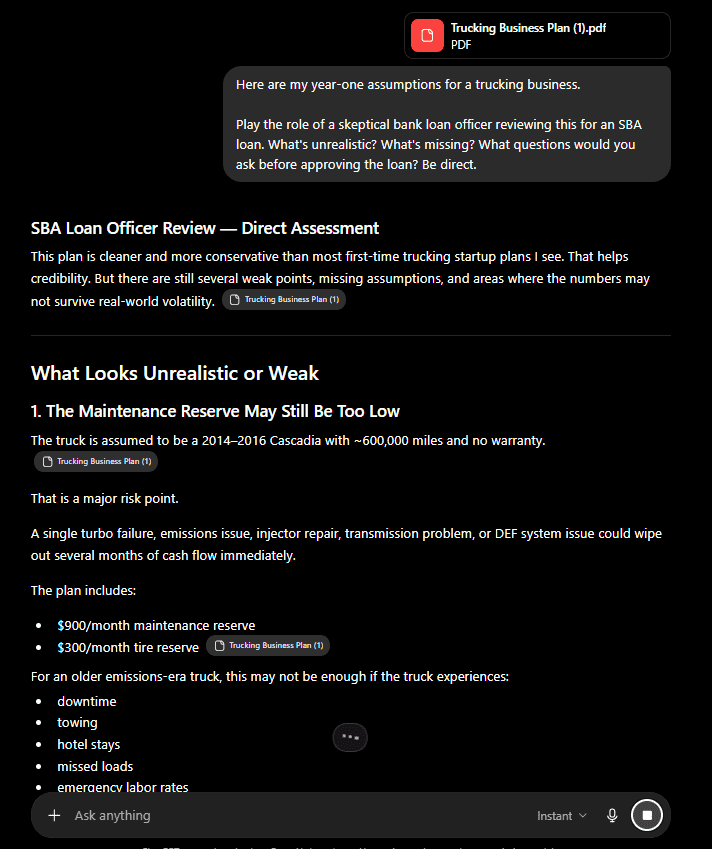
What good output looks like:
- “180 customers/day by month 3 is aggressive for a new shop without a documented marketing plan.”
- “Your forecast has no provision for equipment repair after year 1.”
- “Owner compensation isn’t shown. Lenders will assume you need a salary and reduce your DSCR accordingly.”
- “Your COGS holds at 30% for 36 months, but you haven’t accounted for supplier price increases or inflation.”
- “Year 2 revenue growth of 45% needs a specific explanation tied to a marketing plan or new product.”
Some of those will land. Some won’t apply to your business. The point is to surface them before your lender does.
If you have an existing business:
Paste your actuals alongside your forecast and ask ChatGPT to find the gaps between them.
What assumptions in the forecast aren’t supported by my historical pattern? Where am I being too optimistic compared to what’s actually happened? Where am I being too conservative?
This is the cleanest, fastest use of ChatGPT in the entire workflow. Your data is real. Your forecast is real. ChatGPT compares them and tells you where your story breaks.
4 Rules to ensure honest ChatGPT output
Suggested steps and workflow only work if you know when to rely on ChatGPT and when to stop. These are 5 rules I stick with when using ChatGPT for financial forecasting. They ensure my projections remain grounded and realistic.
1) Never let ChatGPT generate revenue numbers from thin air
Ask ChatGPT, “build me a 3-year revenue forecast for my food truck,” and you’ll get back something like $180K → $310K → $475K. It looks logical, clean, and confident, but completely disconnected from your menu, your location, your capacity, or your marketing budget.
The numbers look reasonable because they’re patterned on other food trucks ChatGPT has read about. Yours is not one of those food trucks.
2) Don’t paste large data dumps and expect accurate analysis
ChatGPT’s input limit is real. Let’s say you paste 36 months of daily sales data, and ChatGPT will silently summarize, sample, or skip portions of it. While the output may look confident, as if it processed everything, when you manually review it, you’ll find it didn’t.
3) Always specify location, size, and stage in your prompts
A bad prompt: “What expenses should I forecast for a coffee shop?”
A good prompt: “I’m opening a 1,200 sq ft coffee shop in downtown Eugene, Oregon, in Q2 2026. I’ll be the single owner, no employees in year 1, with one part-time barista starting in month 4. We’ll roast our own beans on-site. List the expenses I should forecast in year 1, separated into one-time and recurring.”
Every prompt should answer: what business, where, what size, what stage, what model.
4) Don’t tune your prompts toward the answer you want
ChatGPT gives different answers to the same question depending on how you phrase it. For instance, ask “what’s a reasonable growth rate for a coffee shop in year 2?” and you’ll get a measured number. Ask “could a coffee shop reasonably grow 35% in year 2?” and you’ll get validation for 35%.
Founders do this without noticing. You’re not asking what’s reasonable, but you’re asking it to agree with what you already want to believe. The output may sound neutral, but it isn’t.
ChatGPT is great when combined with actual financial forecasting tools
When used correctly and for the right aspects of financial planning and forecasting, ChatGPT is simply brilliant. The problem comes when you over-rely on it and use it in isolation.
Used by itself, you end up editing numbers it generated, defending assumptions it invented, and explaining to a lender why your year 3 net income exceeds your revenue. Used alongside a real forecasting tool, it does what it’s actually good at: helping you think through assumptions, research benchmarks, analyze patterns in your data, and stress-test your plan before someone else does.
The split is simple:
- ChatGPT for the thinking. Revenue streams, assumption frameworks, pattern recognition, scenario logic, skeptical-lender critiques.
- A forecasting tool for math. Linked statements, formulas that update across the model, scenarios you can run in clicks, and a dashboard that a lender or investor can actually read.
A forecasting tool like Upmetrics helps with that. You set the inputs, and the forecasts build themselves (P&L, balance sheet, cash flow, all linked). Change one assumption, and every downstream number updates.
The combination is what works. ChatGPT makes you think faster at thinking. Upmetrics makes the model defensible.
If you’ve been trying to do all of this inside ChatGPT, stop. Run the workflow above with the right tool for each step. The forecast you walk into your next lender or investor meeting with will be a different document.
The Quickest Way to turn a Business Idea into a Business Plan
Fill-in-the-blanks and automatic financials make it easy.

Frequently Asked Questions
What about ChatGPT plugins, custom GPTs, or 'Financial Modeling GPT' — are those better?
Should I share my actual financial data with ChatGPT to get better answers?
What if I don't have a finance background and ChatGPT is the only 'expert' I can afford?

Kaylee Philbrick-Theuerkauf
Kaylee Philbrick-Theuerkauf is the lead business plan consultant at Upmetrics. She specializes in guiding entrepreneurs to create clear and effective business plans. With over 8 years of experience, she has assisted many business owners in achieving their planning goals, raising over $1.5 billion in client funding. Read more