


If you already have a business plan, you’ve probably done most of the hard work. You know your market, what you’re selling, how the business will operate, and what the numbers look like.
But presenting that plan is a different task.
You can’t simply move every detail from the written plan onto slides. At the same time, cutting too much can leave your audience without the information they need. So the real challenge is deciding what to include, what to leave out, and how much detail each part needs.
That’s what I’ll help you figure out in this guide. It covers what belongs in a business plan presentation, how to adjust it based on who you’re presenting to, and how to make the slides easier to follow.
First, let’s get clear on what a business plan presentation actually is.
What is a business plan presentation?
A business plan presentation is a shorter, slide-based version of your business plan used to explain the business to someone reviewing your plan.
Generally, a great business plan presentation explains what your business does, who it serves, how it works, key financial information, and what you want from the audience. You don’t need to turn every section of your written plan into a slide.
After all, the idea is to bring the most important parts of the plan together in a format that’s easier to explain, discuss, and make decisions around.
That’s why you might need one when seeking funding, discussing an opportunity with partners, presenting plans internally, or taking part in a business competition.
If you’re presenting to investors, your business plan presentation may look similar to a pitch deck. But they aren’t always the same. A pitch deck is specifically built for raising investment, while a business plan presentation can be used for investors, lenders, partners, internal teams, and other purposes.
Once you have that foundation, the next decision is what deserves a place in the presentation.
What to include in your business plan presentation?
There’s no universal list of slides that every business plan presentation needs.
And I wouldn’t say you take the sections below and automatically turn each one into a separate slide. Think of them as the main types of information you may include, depending on your business, purpose, and the people you’re presenting to.
The order below is a practical starting point, not a fixed sequence. You can move sections around if another flow makes more sense for your presentation.
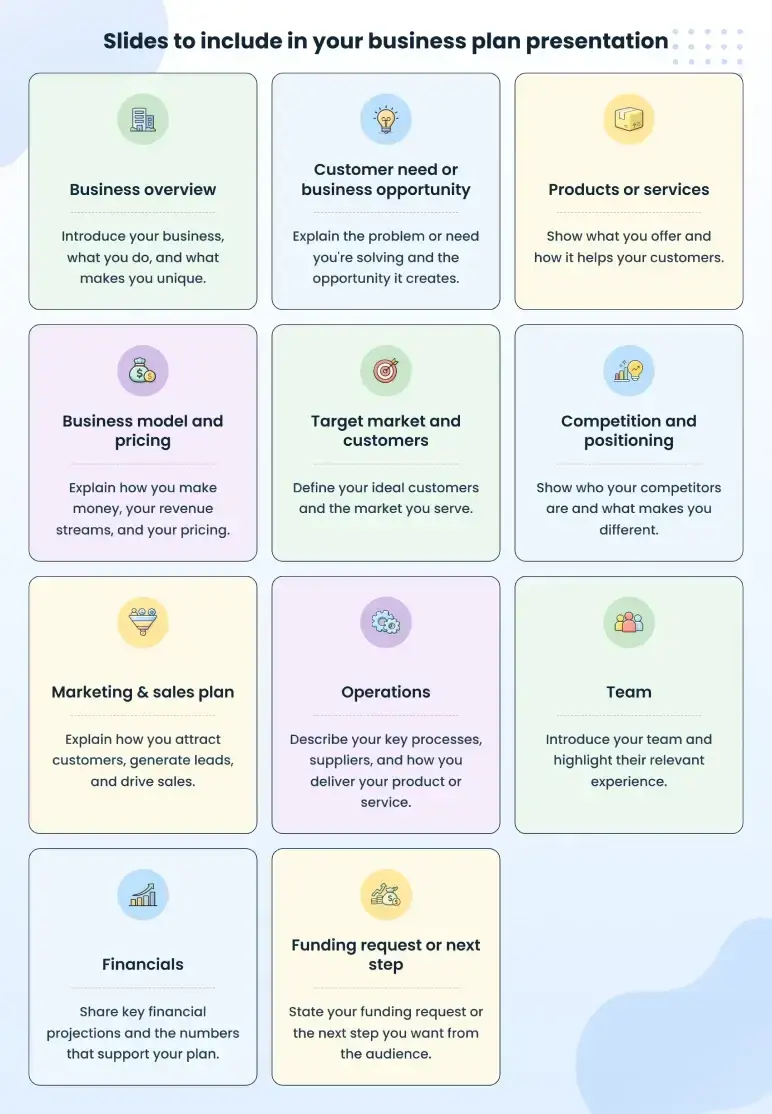
Business overview
Start by giving your audience enough context to understand the business.
That usually means covering:
- What your business does
- What you sell
- Who you serve
- Where you operate (if location matters)
- What stage the business is currently at (if relevant)
Keep this part brief. Someone unfamiliar with your company should be able to understand the basic business idea before you move into the market, offerings, financials, or other details.
For example:
Harbor Lane Laundry is a self-service and wash-and-fold laundromat serving apartment residents and students in downtown Columbus.
That one sentence provides readers a quick picture of the business. You don’t need to add the full company history here unless it directly matters to the presentation.
Customer need or business opportunity
Next, explain why customers would need or want what you’re offering.
Depending on the business, this might include:
- A problem customers struggle with
- An underserved customer group
- Limited options in a local area
- Changing customer behavior
- Growing demand
- Another gap the business can serve
Here, you need to focus on the opportunity that directly supports your business. If possible, back it up with something concrete, such as customer research, existing sales, waitlist data, or another useful proof point.
Products or services
Once the opportunity is clear, explain what customers actually buy from you.
Highlight the main products or services that matter most to the business. Briefly cover who each offer is for, what the customer receives, and its main benefit.
If you sell many products or services, don’t try to show every SKU, package, or service variation. Group similar offers into a few clear categories and keep the smaller details in the full business plan.
For example, a salon could group haircuts, blowouts, and styling under hair services. It could then list color services and treatments as separate services.
The point is to make the offer easy to understand without turning the slide into a catalog.
Business model and pricing (when relevant)
You may not need a separate slide for this if your business has a simple way of making money. In that case, you can mention pricing with your products or services and briefly explain how the business earns revenue elsewhere.
Use a separate slide when you have several revenue streams or a pricing model that needs more explanation.
If you do include it, explain your main revenue streams and how customers are charged. Depending on the business, that could be per purchase, through a subscription, by the hour, through a package or contract, or in another way.
For example, Harbor Lane Laundry may earn revenue from self-service laundry, wash-and-fold, and pickup and delivery. Customers could pay per machine cycle for self-service, per pound for wash-and-fold, and an additional fee for pickup and delivery.
If you have several revenue streams, give more attention to the ones that generate or are expected to generate most of your revenue.
You don’t need detailed sales calculations here. Save those for the financial section later.
Target market and customers
Now show who is most likely to buy from you.
You may include:
- Primary customer groups
- Geographic market (where they are located)
- Relevant customer details
- Market size
- Evidence of demand
- Market trend that affects the business (if any)
I’d suggest you keep this information tied to your business. Your full plan may include a lot of market research data, but the presentation only needs the facts that help people understand who you want to serve and whether enough demand exists.
That means broad industry numbers are not always useful on their own. If your business serves a specific area or customer group, show data that relates more closely to that market.
Use a few facts that make your customer base and market opportunity easy to understand.
Competition and positioning
In this slide, identify and state who your main competitors are and how your business compares.
Begin with the competitors or alternatives your customers are most likely to consider. Then compare them on the factors that actually influence their buying decision, such as price, location, convenience, service level, product range, or specialization.
A simple comparison table works well here because it makes those differences easier to see. For instance:
| Factor | Your business | Competitor A | Competitor B |
| Price | $$ | $ | $$$ |
| Delivery speed | Same day | 2–3 days | Next day |
| Custom service | Yes | Limited | Yes |
| Local support | Yes | No | No |
From there, briefly explain your business positioning. That shows where your business fits in the market and what makes it different from the alternatives customers already have.
For example, you may position the business as the lower-cost option, the more convenient choice, a premium service, or a specialist for a specific customer group.
You can also use a positioning map if customers mainly compare businesses on two clear factors, such as price and service level.
Most importantly, avoid claiming that you have no competition. Even if no company offers exactly the same thing, customers usually have other businesses, substitutes, or ways to meet the same need.
Marketing & sales plan
A good market opportunity only matters if you have a realistic way to reach customers and make sales.
Explain the main marketing channels you plan to use, such as Google search, referrals, partnerships, social media, paid ads, or direct sales. Then briefly explain how customers will buy from you, whether that means visiting a store, booking online, requesting a quote, contacting a sales rep, or buying through a distributor.
If your business is already operating, use the channels that are actually bringing in customers. If it’s new, stick to the few you realistically expect to rely on.
For example, if most customers are expected to come through local search, referrals, and partnerships, give those more attention rather than listing every marketing tactic you might try.
This gives a practical picture of where customers will come from and how they’ll buy from you.
Operations (when relevant)
Operations explain how your business will handle the work needed to deliver its products or services.
This part is useful when someone reading your plan needs to know whether you have the setup and resources to run the business as planned. So rather than explaining every daily task, cover the few operating details that matter most.
These could include:
- Facilities
- Suppliers
- Production
- Service delivery
- Equipment
- Key milestones
For example, a restaurant may cover its location, kitchen capacity, staffing, and key suppliers, while a manufacturer may need to explain its equipment, sourcing, and production capacity.
If your operations are straightforward and don’t need much explanation, you may not need a separate slide.
Team
Now, it’s important to introduce the people responsible for running the business and carrying out the plan.
You don’t need to include everyone or turn the slide into a set of résumés. For each key person, mention their role, main responsibilities, and the experience or skills that make them a good fit for that role.
For example, if your operations manager has spent eight years managing multi-location restaurants, that experience matters far more than listing every job they have previously held.
If there are important roles you still need to hire for, you can mention those as well. This gives a more complete picture of the team you need to run the business.
Financials
This is where you summarize the key numbers behind the business.
You don’t need to add full financial statements. Instead, include the figures that help explain the business’s current financial position and where it is expected to go. That may include:
- Revenue
- Major expenses
- Gross or net profit
- Cash flow
- Break-even point
- Major forecast assumptions
What you include depends partly on the stage of the business. If you’re already operating, you can show recent actual results along with your forecast. If the business is new, rely more on projections and explain the main assumptions behind those numbers.
Keep the detailed statements and calculations in your full financial plan. On the slides, use only the numbers and assumptions needed to explain the financial picture clearly.
Funding request or next step
End the presentation by making the outcome clear.
If you’re asking for funding, state how much money you need, what that amount will be used for, and what that funding is expected to help the business do next. That could include opening a new location, buying equipment, hiring staff, or purchasing inventory.
But not every business plan presentation ends with a funding ask. If the presentation is for an internal decision, the next step might be approval to open a new location, hire a team, or launch a product.
In other cases, you may be asking for a partnership, feedback, or a follow-up meeting.
So the final step must be specific. The audience should know exactly what you want from them and what happens next.
Once you’ve worked through these areas, you don’t need to give each one the same amount of space. You may combine some, give others several slides, or leave a few out entirely, depending on who you’re presenting to and what they need to understand.
Adapt your business plan presentation to your audience
You do not need to create a completely different presentation every time you present it. But you shouldn’t give every audience exactly the same version either.
The main business information usually stays the same. What changes is which information you prioritize, how much detail you provide, and what decision you’re asking the audience to make.
| Audience | Give more attention to |
| Investors | Market opportunity, traction, growth, business model, team, financial outlook, and funding needs |
| Lenders | Historical performance, cash flow, forecasts, funding use, and ability to repay |
| Business partners | Partnership value, responsibilities, economics, market opportunity, and execution |
| Internal teams | Goals, budgets, operations, responsibilities, and key milestones |
I’d think about it this way: before you finalize the slides, ask what this group needs to understand before they can make a decision. That may mean expanding one section, shortening another, or leaving out details that are not useful for that conversation.
The business itself does not change. You are simply giving more space to the information that matters most to the people you are presenting to.
Tips to create a winning business plan presentation
Once you know what information matters most for your audience, you’re ready to shape it into the presentation itself.
Here, I’ve added a few practical tips that can help you keep the slides clear, focused, and easy to follow:
1. Research who you’re presenting to
Before finalizing the slides, look into the person or organization you’ll be presenting to. Knowing what they care about can help you decide what deserves more attention and what questions you should be ready for.
2. Build the slide order around the story, not the business plan
Use your business plan as the source, but don’t follow its section order exactly.
Arrange the slides so one point leads naturally to the next. The presentation should feel easy to follow, without making people jump between unrelated ideas.
3. Give each slide one clear takeaway and support it with proof
Before finalizing a slide, ask: what is the one thing I want someone to understand here?
Make that the main message of the slide. Then support it with a useful fact, number, result, or source when needed. Related details can stay together, but avoid adding extra information that pulls attention away from that main point.
4. Use visuals only when they make the point easier to understand
Charts, tables, timelines, and diagrams can help when they explain something faster than text. You can use a chart for market growth or revenue forecasts, a comparison table for competitors, or a timeline for milestones.
But don’t turn every detail into a graphic. If a short sentence explains the point more clearly, keep it simple.
In short, these small choices can make a big difference in how easy the presentation is to follow and how clearly your main points come across.
Create a business plan presentation with Upmetrics
Summing up! A good business plan presentation doesn’t try to show everything. It pulls out the parts that matter most, gives the right details to the right audience, and makes the business easier to understand.
So the next step is to make sure the business plan behind those slides is complete and consistent. That means having your market research, strategy, operations, and financials worked out before you start simplifying them for the presentation.
That’s where Upmetrics can help you get that foundation in place.
You can use it to build and refine your business plan, prepare financial forecasts, and keep the information you’ll need for the presentation in one place.
And if you’re presenting specifically to investors, Upmetrics can also help you turn that business plan into a more focused, investor-ready pitch deck.
Create an Investor-Ready Business Plan Presentation
Turn your business plan into a clear, professional pitch deck with AI-powered guidance.

Frequently Asked Questions
What format should you use for a business plan presentation?
How many slides should a business plan presentation have?
How long should a business plan presentation be?
How often should you update your business plan presentation?

Vinay Kevadia
Vinay Kevadiya is the founder and CEO of Upmetrics, the #1 business planning software. His ultimate goal with Upmetrics is to revolutionize how entrepreneurs create, manage, and execute their business plans. He enjoys sharing his insights on business planning and other relevant topics through his articles and blog posts. Read more