


 Download Now: Investor Pitch Templates
You may already know your product, business model, target market, and early numbers. But turning those details into a short, focused presentation can still be difficult, especially when you’re unsure about:
- What belongs in the deck, and what should you leave out?
- What should each slide prove?
- What if you don’t have strong traction yet?
- Where do the financials and funding ask fit?
The answers to these questions determine whether investors can quickly understand the opportunity, trust your key claims, and see why the business deserves a closer look.
That’s what this guide will help you work through. I’ll show you how to structure an investment-ready pitch deck, what to include on each slide, and what to check before you send or present it.
How to make an investor-ready pitch deck in 10 slides?
Most pre-seed and seed decks need about 10–15 main slides, plus an appendix. The structure below covers the ten core slides:
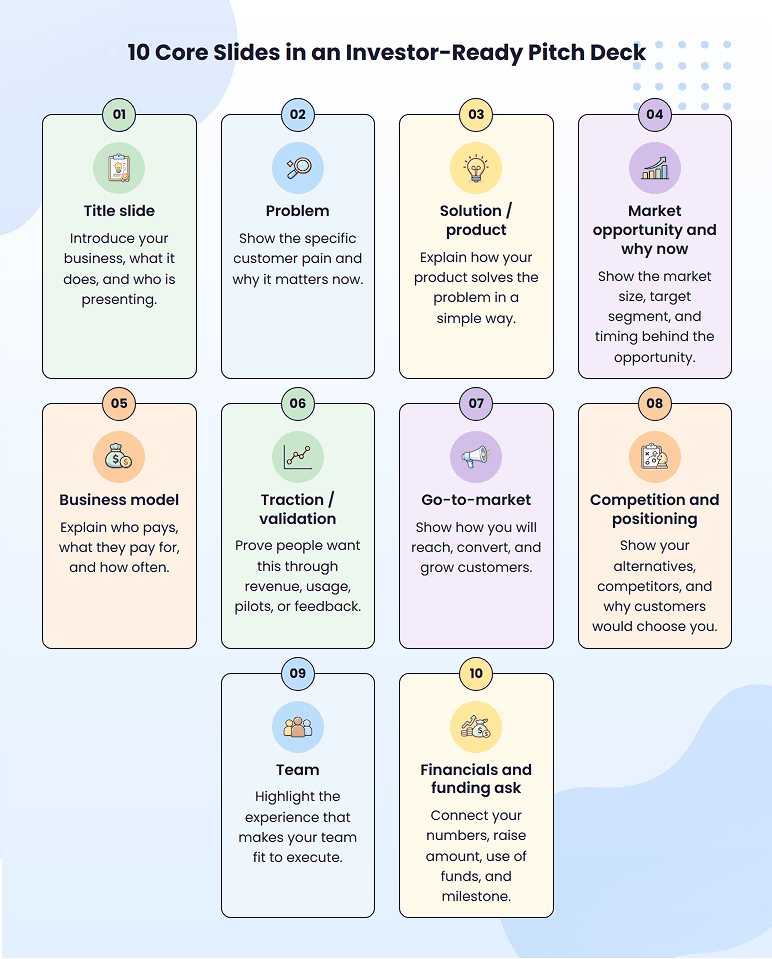
Use this structure as a starting point. Some founders combine a few sections if the business is still early or if two points fit naturally together. But each slide still needs to do a clear job.
You can also change the order depending on what is strongest in your business. If traction is your biggest proof, you may bring it earlier. If the product needs more explanation, you may spend more space there. But do not cut a slide just to make the deck shorter.
Let’s go slide by slide and look at how to make a pitch deck that wins investors:
1. Title slide
Your title slide should make it immediately clear what your company does and who it serves.
You don’t need to make this slide fancy. Just include your company name, logo, a clear tagline, founder name, contact details, and your current stage if it’s relevant.
The tagline is the one-line description that actually matters. It’s the first thing anyone reads, so it should tell them what your business does and who it helps before they even get into the rest of the deck.
So skip the vague lines like:
That sounds polished, but it does not explain much.
A clearer version would be:
Now the reader knows the product and the target customer right away.
2. Problem
The problem slide should make one thing clear: why your business needs to exist.
Avoid broad statements like “businesses waste time” or “customers need better tools.” They may be true, but they do not show real pain. Also, do not list every possible problem your audience has. Pick the main problem your product is built to solve.
A strong problem slide usually answers three questions:
| Your problem slide should show | What to clarify |
| Who has the problem | The exact customer or user group |
| What is going wrong | The task, process, or situation creating the pain |
| Why it matters | The cost in time, money, missed revenue, risk, churn, delays, or effort |
If customers already use a workaround, mention it briefly. It shows the problem is not just theoretical. People are already spending time, money, or effort trying to deal with it.
You can also support the slide with one or two proof points. This could be a customer quote, survey result, industry stat, usage data, support request, or a repeated complaint from customer interviews. Do not turn the slide into a research report. Just add enough evidence to make the pain believable.
Hence, check whether the problem is specific enough that your solution feels necessary, not just nice to have.
3. Solution or product
After the problem slide, don’t rush into showing everything your product can do.
This is where many founders lose clarity. They know the product deeply, so they try to explain every feature, workflow, integration, and future idea. But someone reviewing a deck is still trying to understand one simple thing: how does this solve the problem you just described?
So focus more on these things:
- What the product or service helps the customer do
- How it works at a simple level
- What changes for the customer after using it
You might use a simple screenshot, prototype, demo flow, service process, or before-and-after view. But only add a visual if it makes the solution easier to understand. If it needs too many labels or explanations, simplify it.
Also, avoid leading with technical labels like “AI-powered platform,” “integrated ecosystem,” or “end-to-end dashboard.” They may sound impressive, but they do not explain the value on their own. Say what the product helps the customer do first.
If the product is still early, that is fine. A prototype, beta screen, service flow, or demo concept can work as long as it shows how the solution is supposed to work.
4. Market opportunity and why now
In the market slide, show that your business is not just solving a problem. It should prove there is a real customer segment to start with, room to grow, and a reason this opportunity matters now.
A big market number can support that point, but it should not carry the whole slide. This is where many decks start to feel inflated. Founders show a huge industry size, but they don’t explain where they will actually start or why that segment is reachable.
A simple way to plan this slide is to cover three things: where you’re starting, what it can grow into, and why now is the right time.
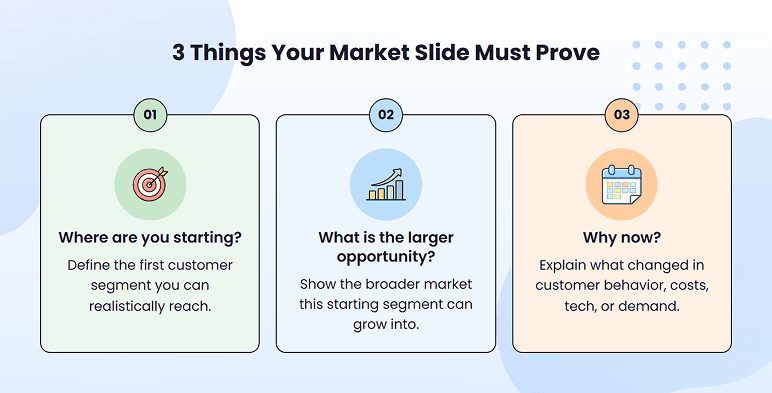
Start with the customer segment you can realistically reach first. Avoid broad groups like “all small businesses” or “the global healthcare market.” Pick the segment where the pain is strongest, the buying need is clear, or you already have early proof.
Then show the larger opportunity around that segment. The market number should support your story, not replace it.
If you use TAM, SAM, and SOM, keep the numbers simple and connected to your actual customer, not just a broad industry category.
Finally, explain why now. This could be a change in customer behavior, rising costs, new technology, regulation, competition, or demand. The point is to show why this opportunity is opening now, not just that the market exists.
5. Business model
Your business model slide should make it clear who pays, what they pay for, and how the business earns money. Simply calling the model “subscription,” “commission,” or “freemium” is not enough because those labels do not explain how the model works in practice.
To make that clear, show:
- Who actually pays for the product or service?
- What do they get in return, such as access, usage, setup, service, license, or a transaction?
- Whether they pay once, monthly, per transaction, per seat, or by usage?
- Which major costs affect how much revenue you keep, such as delivery, fulfillment, onboarding, or support?
Keep focus more on your main revenue stream. If you have several possible ways to make money, don’t present all of them equally. Lead with the one you are really testing, selling, or relying on first.
A focused model is easier to believe than a slide full of future revenue ideas.
If your pricing is still early, say that clearly. You can show a price range, pilot pricing, current assumption, or what early customers have agreed to pay. That feels more credible than showing a polished number with no backing.
6. Traction/validation
This slide is not about making the business look bigger than it is. It is about showing that people in your target market are taking meaningful action and that the business is making progress.
If you already have customers, revenue, or product usage, lead with the one to three metrics that best show demand, growth, or customer retention. Depending on your business, this may include:
- Revenue growth or paying customers
- Repeat purchases, renewals, or retention
- Active users or product usage
- Signed contracts or paid pilots
- Conversion or early channel results
Choose metrics that show whether the right customers are paying or using the product, whether the result is improving, and whether customers are staying or returning.
Give investors enough context to evaluate each result. Include the customer segment, timeframe, and a comparison that shows progress.
If you are pre-revenue or still have limited traction, show the strongest validation available. This may include:
- Customer interviews
- Pilot user
- Pre orders
- Letters of intent
- A waitlist of target customers
- A minimum viable product (MVP)
Lead with the strongest signal available and be clear about what it proves. Paid pilots and preorders usually show stronger commitment than interviews, waitlists, or nonbinding letters of intent.
For example, if a waitlist is your strongest signal, add enough context to make it meaningful:
This is stronger than “80 signups” because it explains who responded, how quickly they responded, and what prompted their interest.
Avoid filling the slide with website visits, social followers, quotes, product launches, and every signup you have collected. Include only the evidence that helps investors understand customer demand or meaningful progress.
7. Go-to-market
Don’t turn this slide into a marketing channel list.
This slide should show your first believable path to customers, not every marketing channel you might use someday.
“SEO, paid ads, social media, email, and partnerships” may sound active, but it doesn’t explain how your first customers will actually find you and decide to buy.
Instead, show the route you’ll focus on first:
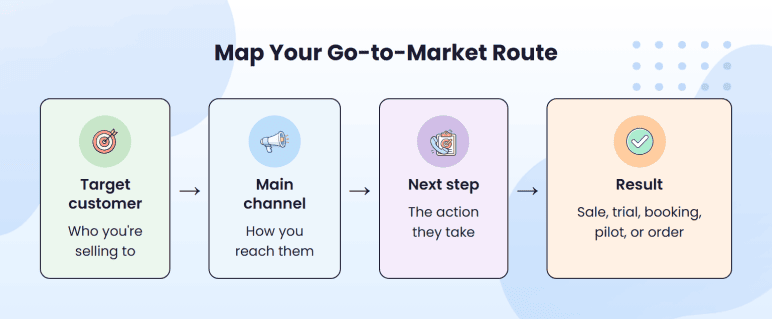
For example, “founder-led outreach to independent clinics → demo call → paid pilot” shows a clearer go-to-market path. It is stronger than saying “we’ll use outbound sales and partnerships” because it highlights the customer, the channel, and the next expected action.
Select the channel based on how your customers already behave. Do they search on Google? Ask peers for recommendations? Attend industry events? Respond to direct outreach? Compare vendors through demos? That behavior should guide the route you show.
If you already have CAC (Customer Acquisition Cost), conversion rate, sales cycle, or early channel results, include the most useful number. If not, show what you’re testing first and why it makes sense for that customer.
8. Competition and positioning
Saying “we have no competitors” rarely helps. It usually makes the slide less believable.
Start with three to five alternatives that your target customer would genuinely consider. These may include:
- Direct competitors offer a similar solution to a similar customer.
- Indirect competitors solve the same problem in a different way.
- The status quo may be a manual process, an internal team, an outside service, or doing nothing.
Compare them using the factors that actually affect the customer’s decision, such as price, setup time, ease of use, industry fit, results, or switching effort.
That comparison should make your positioning clear. Don’t create a table where your company receives every check mark and every competitor looks weak. Show where other options perform well and acknowledge the specific customer or situation your product serves better.
For example, this is too vague:
A clearer position would be:
That works because it names the customer, the alternatives, and the reason your product is a good fit.
Where possible, support that difference with customer feedback, pilot results, switching reasons, or a measurable improvement in cost, time, or outcomes. This shows why customers would choose you today (your positioning).
Investors may even ask about defensibility that could make your advantage harder to copy over time. You do not need to invent a moat at an early stage, but briefly mention any genuine advantage that could strengthen as you grow.
9. Team
The team slide is not a place for full resumes. It should show who is building the business, what each person owns, and whether the team has the experience to execute the plan.
Include the founders and any current team member responsible for a critical part of the business. For each person, show:
- Name, role, and what they currently own
- One or two relevant background details connected to the product, customer, or industry
- One concrete proof point showing what they have already built, grown, sold, or operated
Keep each profile to a few lines. Choose a proof point that directly supports the person’s role. For example, “managed operations across 20 clinics” is more useful than “healthcare experience.”
You do not need famous employers or previous exits. Relevant industry knowledge, technical ability, customer access, or experience building something similar can be just as persuasive.
If a critical capability is missing, mention the gap and explain how you plan to address it. Clearly label future hires as planned. If you are a solo founder, show what you can lead now and which critical capability you plan to add next.
Include advisors, consultants, or contractors only when they play an active, important role. Do not use them to make the team appear more complete than it is.
10. Financials and funding ask
This part of the deck should show the business’s current financial position, what you expect over the next few years, and how much capital you need to reach the next stage.
For an early-stage company with a simple financial story, you can usually combine the financials and funding ask on one slide. If you have a meaningful operating history or either part needs more explanation, use two slides to keep the information easy to follow.
If you have operating history, lead with the few numbers that best explain performance, such as:
- Revenue and growth
- Gross margin
- Burn rate and runway
- A simple forecast based on two or three key assumptions
Clearly separate historical results from projected figures.
If you’re pre-revenue, focus on likely spending, runway, launch/pilot goals, and the assumptions in your forecast. They will still be estimates, but the investor should be able to understand how you made those estimates and if they’re realistic.
Then state the funding request clearly. Include the amount of money you’re raising, the primary categories where the capital will be used, and the steps you’ll take to reach the milestone.
For example:
This is stronger than simply saying the money will be used for “product, marketing, and hiring” since it ties the money to business progress.
Once all ten slides are drafted, read the deck from beginning to end. It should come together as one clear story, with the same customer, assumptions, and numbers carried throughout. Each slide should add something new and prepare investors for what comes next.
If you want to see how this works in practice, review a few pitch deck examples from successful companies such as Airbnb, Uber, and LinkedIn. Focus on how the story develops rather than copying the exact slide order.
Your deck should feel just as connected. If a slide repeats a point, changes direction, or interrupts the flow, reorder, combine, or remove it. By the time investors reach the funding ask, it should feel like the natural next step.
Guessing at the numbers investors will question?
Build financials your funding ask can stand on

What belongs in the pitch deck appendix?
The appendix is usually included at the end of the same pitch deck. It holds supporting details that investors may want to review after they understand the main opportunity.
It may include:
- Detailed financial projections and assumptions
- Market-sizing calculations and sources
- Customer, pilot, retention, or sales-pipeline data
- Product roadmap or technical details
- Deeper competitor analysis
- Detailed use of funds or hiring plans
You do not need every item. Add only the slides that support claims in the main deck or answer questions investors are likely to ask.
Design tips for an investment-ready pitch deck
Now that the slide content is clear, make sure the deck is simple to follow.
You don’t need a designer to build a solid pitch deck. Successful pitch decks make the main point of each slide easy to grasp. Clean formatting, readable numbers, and clear visual hierarchy reduce the effort required to follow the story.
For live presentations, Guy Kawasaki’s 10/20/30 rule is a useful benchmark: around 10 slides, presented in 20 minutes or less, with text large enough to read easily, with a minimum 30-point font. A send-ahead deck may require slightly more context, but it should remain easy to scan.
You don’t have to follow it exactly, especially if your pitch slot is shorter, but the principle is helpful: keep the deck focused and avoid overcrowding the slides.
Also, use these checks before you send it:
- Stick to one idea per slide. When one slide is trying to explain three things, break them up or make them easier to understand.
- Cut heavy text. Avoid paragraphs and use short phrases, key numbers, and takeaways.
- Use visuals with a purpose. Include charts, screenshots, workflows, timelines, or comparisons only when they better explain a concept than the written text.
- Make numbers readable. Don’t use small charts, tables, and screenshots of financial data that require extensive explanation.
- Keep the format consistent. Use the same fonts, colors, spacing, and chart style throughout the deck.
- Move extra detail to the appendix. If a slide feels crowded, keep the main point and push the deeper explanation back.
Good design will not fix a weak pitch. But a messy design can make a strong one harder to understand. The goal is simple: make the story clear.
Final checks before sending your pitch deck
Now that the deck is complete, review the exact version the investor will receive. This helps you catch problems that are easy to miss while drafting and editing the slides.
Use the table below for the final check:
| Final check | What to do |
| Can someone understand it without your pitch? | Ask someone unfamiliar with the business to read it. The opportunity, strongest evidence, and funding ask should be clear without your explanation. |
| Is every slide finished? | Remove comments, placeholders, draft copy, hidden notes, and incomplete slides. |
| Does everything display correctly? | Check that no text, charts, images, or fonts are missing, cropped, or difficult to read. |
| Can investors open what you shared? | Open the deck and linked materials in a private browser to confirm they work without access requests. |
| Are you sharing only what is needed? | Remove confidential customer information and internal details that investors do not need at this stage. |
| Is the information up to date? | Confirm that the traction, team details, financials, dates, and funding ask include your latest updates. |
Fix anything this review uncovers and then send the same version you checked.
Build your pitch deck faster with Upmetrics
Now that you know what belongs in your pitch deck and what each slide needs to show, the next step is to build the first complete version using your latest research, traction, financials, and funding ask.
If you want to make the process easier, use Upmetrics’ AI pitch deck builder that helps you create a first draft without arranging every slide from scratch.
Simply describe what you are pitching, select the tone, and it will generate the core slides in a clear order. You can edit the content, reorder the slides, and even customize the design to make it more suitable for your business.
If you already have your business plan in Upmetrics, you can import your plan’s data and financials into the deck, so you don’t have to enter them on every slide.
Use the generated deck as a working draft. Include the best possible proof, double-check the numbers, and link the funding request to milestones. Thereafter, it will be ready for the final review and investor conversations.
The Quickest Way to turn a Business Idea into a Business Plan
Fill-in-the-blanks and automatic financials make it easy.

Frequently Asked Questions
What's the difference between a pitch deck and a business plan?
What type of pitch deck should I build before sending it to investors?
What file format should I send?
How long should a pitch deck be (in time)?
Can I make a pitch deck using AI?
How do pitch deck expectations change by startup stage?
How do I send a pitch deck to investors?

Vinay Kevadia
Vinay Kevadiya is the founder and CEO of Upmetrics, the #1 business planning software. His ultimate goal with Upmetrics is to revolutionize how entrepreneurs create, manage, and execute their business plans. He enjoys sharing his insights on business planning and other relevant topics through his articles and blog posts. Read more